Prilixor

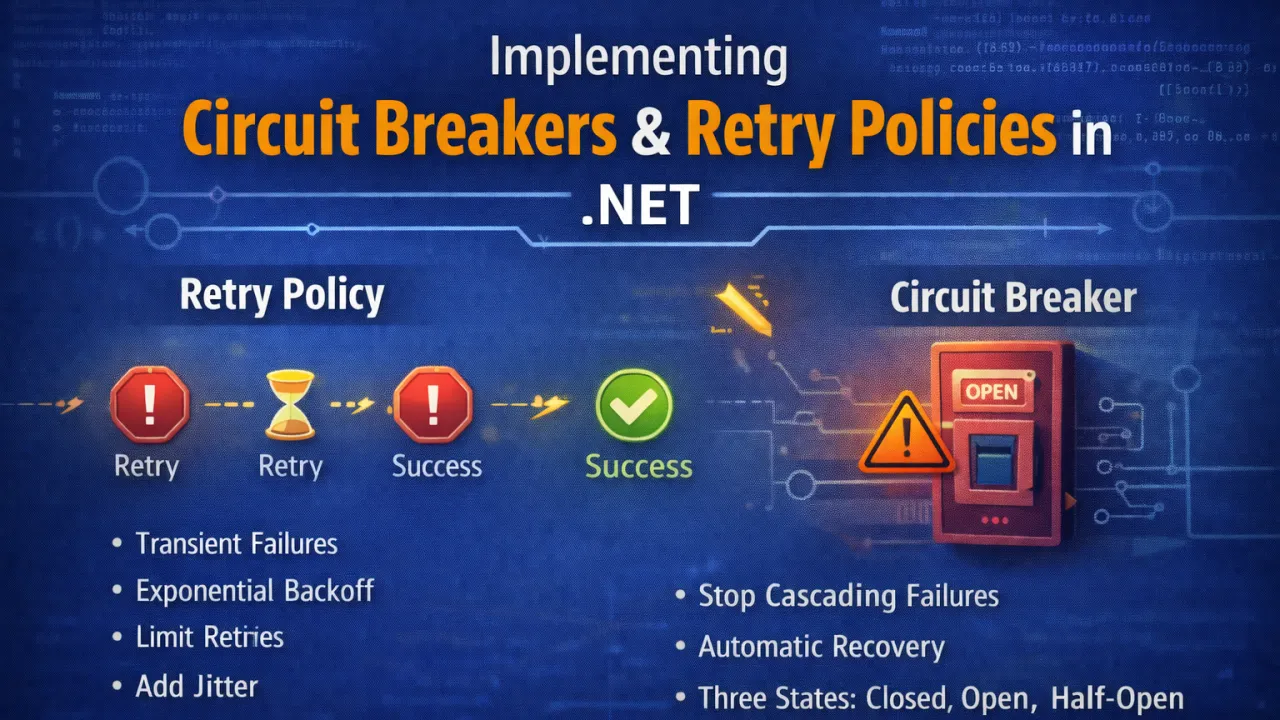
Implementing Circuit Breakers & Retry Policies in .NET

Modern distributed systems rarely operate in isolation. Most applications rely on external services, third-party APIs, databases, and microservices to deliver functionality. While this architecture increases flexibility and scalability, it also introduces a new challenge: network and service failures are inevitable.

Temporary outages, slow responses, or overloaded services can cascade across systems and bring down entire applications if not handled properly.

This is where resilience patterns like Retry Policies and Circuit Breakers become essential. These patterns allow .NET applications to gracefully handle failures, maintain stability, and protect downstream services.

Why Resilience Matters in Modern Applications

In distributed architectures, failures are not exceptions — they are normal operating conditions.

Examples include:

  • Temporary network interruptions
  • External APIs returning intermittent errors
  • Services becoming overloaded
  • Database latency spikes
  • Cloud infrastructure hiccups

Without resilience mechanisms, applications may repeatedly attempt failing operations, amplifying the problem and overwhelming dependent systems.

Circuit breakers and retry policies help prevent this by controlling how applications respond to failures.

Understanding Retry Policies

A retry policy automatically retries failed operations when errors occur. This is particularly useful for transient failures, which are temporary issues that often resolve themselves quickly.

Examples of transient errors include:

  • Temporary network disconnections
  • Service timeouts
  • Rate-limited requests
  • Temporary database locks

Instead of immediately failing a request, the application waits briefly and attempts the operation again.

When Retry Policies Are Useful

Retry strategies are effective when failures are temporary and recoverable.

Common use cases include:

  • Calling external APIs
  • Communicating with microservices
  • Accessing cloud resources
  • Database operations during transient load spikes

Best Practices for Retry Policies

Retry logic should be implemented carefully to avoid causing additional problems.

Key practices include:

Use Exponential Backoff Each retry waits longer than the previous one to avoid overwhelming the system.

Limit Retry Attempts Avoid infinite retries that could exhaust system resources.

Add Jitter Random delays prevent multiple services from retrying simultaneously.

Retry Only for Transient Errors Permanent errors (such as invalid requests) should not trigger retries.

Understanding the Circuit Breaker Pattern

While retry policies handle temporary failures, they can worsen problems if the service being called is completely unavailable.

This is where the Circuit Breaker pattern becomes critical.

A circuit breaker acts like an electrical circuit breaker:

  • If too many failures occur, the circuit opens.
  • While open, requests fail immediately instead of attempting the call.
  • After a cooldown period, the circuit enters a half-open state to test whether the service has recovered.

The Three States of a Circuit Breaker

Closed State Requests flow normally. Failures are monitored.

Open State Requests are blocked temporarily to prevent further stress on the failing service.

Half-Open State A limited number of test requests determine whether the service has recovered.

If successful, the circuit closes again. If failures continue, it reopens.

Why Circuit Breakers Are Important

Without a circuit breaker:

  • Services continuously retry failing requests
  • System resources are wasted
  • Failures cascade across services
  • Recovery becomes slower

Circuit breakers protect both your application and the services it depends on.

Implementing Resilience in .NET with Polly

In the .NET ecosystem, the most widely used library for resilience policies is Polly.

Polly provides support for:

  • Retry policies
  • Circuit breakers
  • Timeout policies
  • Bulkhead isolation
  • Fallback strategies

Polly integrates seamlessly with HttpClientFactory in ASP.NET Core, making it easy to apply resilience policies to outgoing HTTP calls.

Example concept:

Retry → Wait → Retry again → Circuit opens if failures persist

With Polly, developers can configure retry attempts, backoff strategies, and circuit breaker thresholds with minimal effort.

Combining Retry and Circuit Breaker Policies

Retry and circuit breaker patterns work best when used together.

A typical strategy might look like this:

  1. Retry a request a few times for transient failures.
  2. If repeated failures occur, open the circuit breaker.
  3. Temporarily stop sending requests.
  4. Periodically test if the service has recovered.

This approach prevents systems from repeatedly hitting a failing dependency.

Additional Resilience Techniques

Circuit breakers and retries are part of a broader resilience toolkit.

Other useful strategies include:

Timeout Policies Prevent requests from waiting indefinitely.

Bulkhead Isolation Limit resource usage to prevent one failing component from affecting others.

Fallback Mechanisms Provide alternative responses when services fail.

Rate Limiting Protect systems from overload during traffic spikes.

Observability and Monitoring

Resilience patterns are only effective when combined with strong monitoring and observability.

Teams should monitor:

  • Retry counts
  • Circuit breaker states
  • External service response times
  • Failure rates

Tools such as Application Insights, Prometheus, Grafana, and OpenTelemetry provide valuable insights into system behavior.

Monitoring ensures teams know when circuit breakers activate and why failures occur.

Key Lessons for Building Resilient .NET Applications

To implement effective resilience strategies:

  • Use retry policies for transient failures • Apply circuit breakers to prevent cascading failures • Combine retries with exponential backoff and jitter • Limit retry attempts to avoid resource exhaustion • Monitor circuit breaker behavior with observability tools • Protect critical resources with bulkhead isolation

Final Thoughts

In distributed systems, failures are not rare events — they are expected conditions.

Applications that assume everything will always work eventually face cascading failures and system outages.

By implementing retry policies and circuit breakers, .NET applications become more resilient, stable, and capable of handling real-world conditions.

These patterns don’t eliminate failures — but they ensure failures don’t bring down the entire system.

Resilience is no longer optional. It’s a fundamental requirement for modern, scalable software architectures.
How to Design Azure Solutions for 10x Traffic Without Rewrites

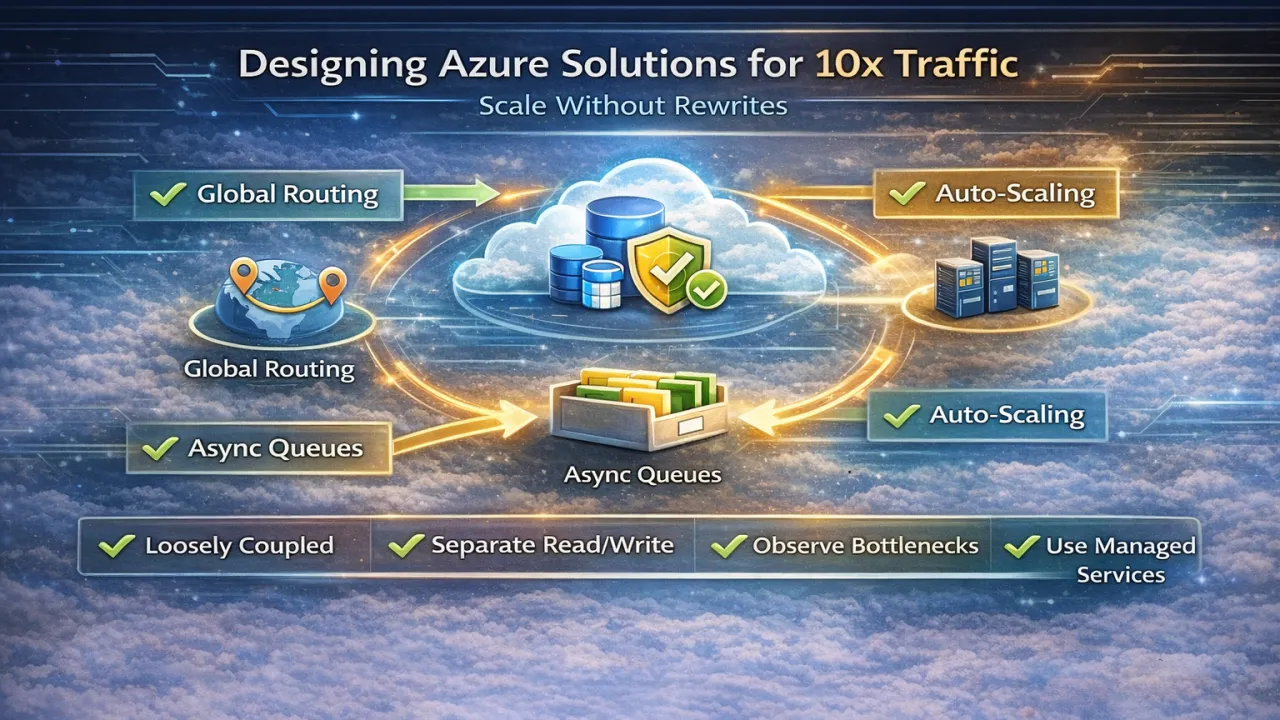
Most systems don’t fail because they can’t handle traffic—they fail because they were never designed to scale gracefully. When traffic grows 10×, teams often assume a rewrite is inevitable. In reality, large traffic increases rarely require new architectures; they require better architectural decisions early on.

Designing Azure solutions that scale by an order of magnitude without rewrites is about eliminating bottlenecks, embracing elasticity, and decoupling critical paths, not adding complexity.

Design for Scale at the Boundaries, Not the Core

The biggest mistake teams make is pushing scalability concerns deep into business logic. In well-designed Azure systems, scalability is handled at the edges—load balancing, messaging, caching, and throttling—while core business logic remains stable. When APIs, queues, and compute layers scale independently, the system absorbs traffic growth without invasive code changes.

This is why Azure-native services matter: they provide elasticity around your application instead of forcing your application to manage elasticity itself.

Favor Asynchronous Workflows Early

Synchronous request chains are the fastest way to hit scaling limits. When traffic spikes, synchronous dependencies amplify latency, exhaust threads, and cascade failures. Systems designed to handle 10× traffic push non-critical work into asynchronous flows using messaging, background processing, or event-driven patterns.

The result is simple but powerful: traffic becomes queue depth, not downtime. Your system stays responsive even when demand explodes.

Scale Reads and Writes Differently

Most traffic growth is not uniform. Reads often grow faster than writes, and treating them the same creates unnecessary bottlenecks. Azure solutions that scale well separate read-heavy paths from write-heavy ones—using caching, read replicas, or optimized query models—without changing core logic.

This separation allows teams to absorb traffic growth with configuration and infrastructure adjustments rather than refactoring application code.

Eliminate Shared Bottlenecks Before They Matter

Systems rarely fail everywhere at once—they fail at shared choke points. Common examples include centralized databases, synchronous integrations, or shared compute pools. Designing for 10× traffic means identifying these bottlenecks early and isolating them through partitioning, caching, or independent scaling units.

The goal is not infinite scalability—it’s predictable scalability.

Build Observability Before You Need It

You can’t scale what you can’t see. Systems that survive traffic spikes have strong observability long before those spikes occur. Metrics, tracing, and meaningful alerts allow teams to understand where load is increasing and why, enabling targeted scaling instead of reactive rewrites.

In Azure environments, observability is not optional—it’s the feedback loop that makes scaling decisions safe.

Let the Platform Do the Heavy Lifting

One of the biggest advantages of Azure is that many scaling problems are already solved—if you let the platform handle them. Auto-scaling compute, managed messaging, caching services, and global routing all exist to absorb growth without code changes. Teams that fight the platform tend to rewrite; teams that design with it rarely do.

Final Thoughts

Scaling to 10× traffic is not a heroic rewrite—it’s a design outcome.

Azure solutions that scale without rewrites share common traits: loose coupling, asynchronous boundaries, isolated bottlenecks, clear observability, and intentional use of managed services. When these principles are in place, traffic growth becomes a capacity planning exercise—not an architectural emergency.

The best scaling strategy is the one you don’t notice when traffic explodes.

Design for growth early, and your system will scale quietly—without drama, downtime, or rewrites.

Trade-offs Between Clean Architecture vs Vertical Slice Architecture

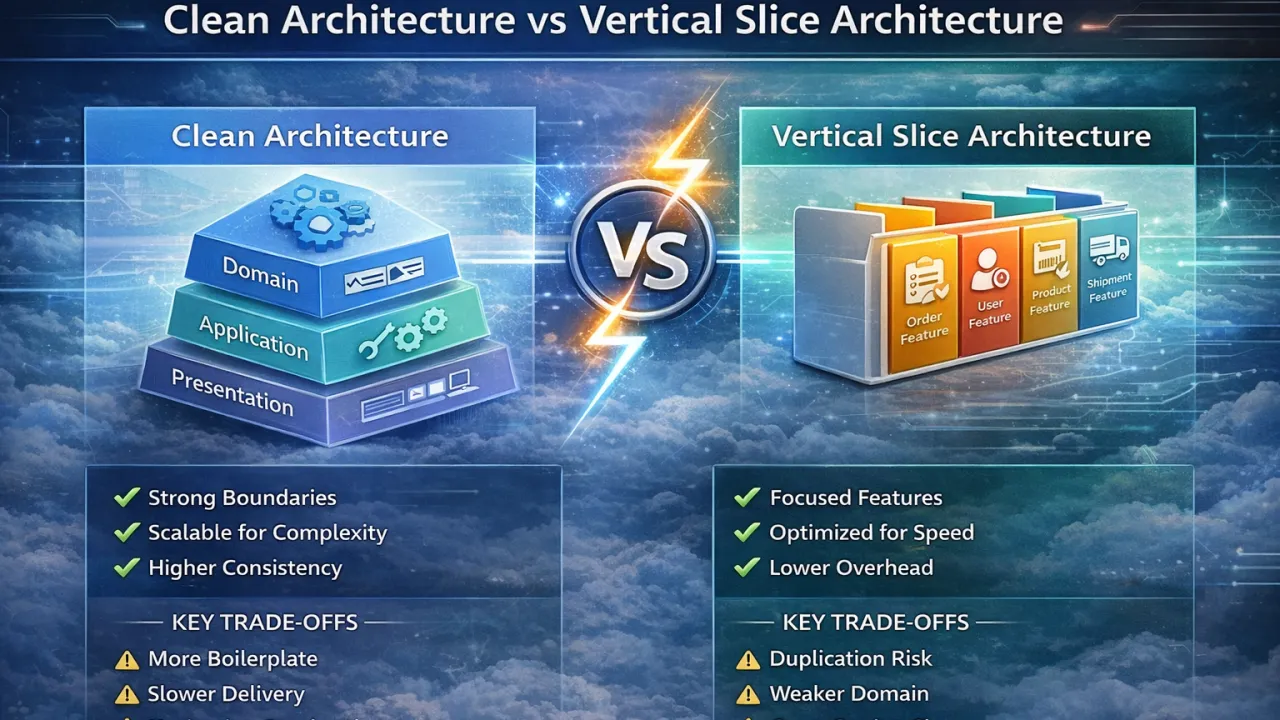
Choosing between Clean Architecture and Vertical Slice Architecture is less about right or wrong and more about understanding trade-offs. Both approaches are widely used in modern .NET systems, but they optimize for very different priorities. Teams often run into problems not because they chose the wrong architecture, but because they chose it without aligning it to their context.

Clean Architecture – What It Optimizes For

Clean Architecture focuses on strong separation of concerns and long-term maintainability. It emphasizes keeping business rules independent of frameworks and infrastructure.

Key strengths:

  • Clear layering and dependency rules
  • Strong domain protection and testability
  • Easier governance in large teams
  • Better suited for complex, stable domains

Trade-offs:

  • Higher upfront complexity
  • More abstractions and boilerplate
  • Slower feature delivery in fast-moving systems
  • Increased cognitive overhead for developers

Vertical Slice Architecture – What It Optimizes For

Vertical Slice Architecture organizes code around features and use cases instead of technical layers. Each slice contains everything required to deliver a specific capability.

Key strengths:

  • Faster feature development
  • Localized changes with minimal side effects
  • Lower cognitive load per feature
  • Strong alignment with APIs and use cases

Trade-offs:

  • Risk of logic duplication
  • Weaker domain centralization
  • Harder to enforce global consistency
  • Requires discipline to manage cross-cutting concerns

In modern cloud-native .NET systems, the debate has shifted. Services are smaller, deployment units are independent, and change frequency is high. This reality often favors vertical slices for application workflows, while clean architectural principles still add value when modeling complex business domains. As a result, many successful teams adopt a hybrid approach—using vertical slices at the edges for delivery speed and clean architecture principles internally where domain integrity matters most.

The real takeaway is this: architecture should follow the rate of change, not ideology. Clean Architecture shines when protecting complex domains over time, while Vertical Slice Architecture excels when rapid iteration and clarity of intent are the priority. Strong teams understand both models and choose deliberately—adapting as the system and organization evolve.

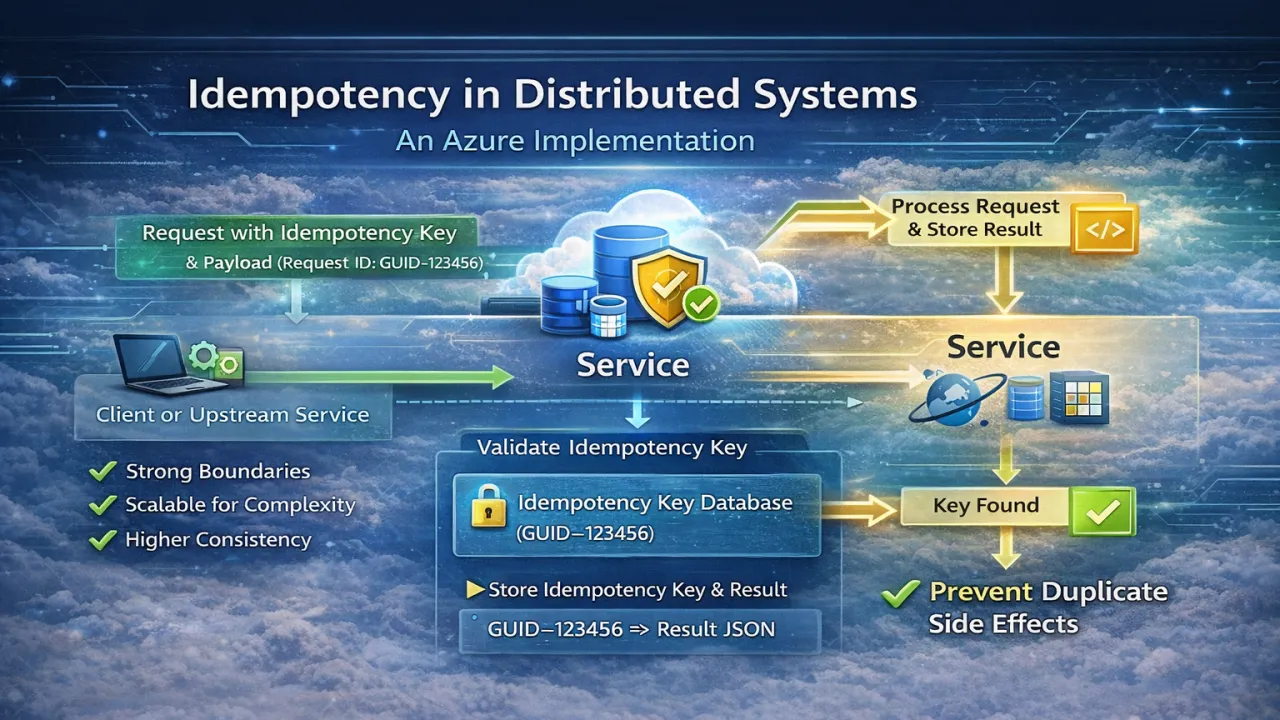
Idempotency in Distributed Systems – A Real Azure Implementation

In distributed systems, duplicate requests are not an edge case—they are inevitable. Network retries, client timeouts, message redelivery, and partial failures all lead to the same operation being executed more than once. Without proper safeguards, these duplicates cause corrupted data, double charges, inconsistent state, and hard-to-debug production incidents.

This is why idempotency is a foundational requirement for reliable distributed systems—especially in Azure-based architectures that rely heavily on retries, messaging, and asynchronous processing.

Why Idempotency Matters in Azure Systems

Azure services are designed for resiliency, not guarantees of single execution. Message queues deliver at least once, APIs may be retried automatically, and clients often resend requests when they don’t receive a response in time. From the platform’s perspective, this is correct behavior. From the application’s perspective, it can be disastrous if operations are not idempotent.

In practical terms, idempotency ensures that performing the same operation multiple times produces the same result as performing it once. The system becomes safe under retries and failures—exactly the conditions distributed systems operate in.

Where Idempotency Is Commonly Required

In real Azure implementations, idempotency is critical in:

  • API endpoints handling commands (payments, orders, registrations)
  • Message consumers processing Service Bus or Event Grid events
  • Background jobs triggered by retries
  • Workflow steps in long-running processes

Any operation that changes state must assume it may run more than once.

A Practical Azure Idempotency Pattern

A common and effective pattern in Azure systems is idempotency keys.

When a client or upstream service sends a request, it includes a unique idempotency key (often a GUID). The service then:

  1. Checks whether the key has already been processed
  2. If yes, returns the previous result
  3. If no, processes the request and stores the result with the key

This record is stored in a durable store such as Azure SQL, Cosmos DB, or Table Storage. The key becomes the source of truth that prevents duplicate side effects.

Idempotency in Messaging Scenarios

Azure Service Bus guarantees at-least-once delivery, not exactly-once processing. This means consumers must assume duplicate messages will arrive.

In production systems, consumers typically:

  • Use the message ID or a business correlation ID
  • Store processed message IDs
  • Ensure side-effects (database writes, external calls) are safe to repeat

The goal is not to stop duplicates—it’s to neutralize their impact.

What Idempotency Is NOT

A common misconception is that idempotency is handled by:

  • Disabling retries
  • Relying on transactions alone
  • Assuming infrastructure guarantees uniqueness

None of these work reliably in distributed systems. Idempotency is an application-level responsibility, not something the platform can fully solve for you.

Trade-offs and Design Considerations

Implementing idempotency introduces its own considerations:

  • Storage overhead for processed keys
  • Cleanup strategies for old records
  • Slight increase in write latency
  • Clear definition of what “same request” means

These trade-offs are minor compared to the cost of corrupted state, customer impact, and emergency fixes.

Final Thoughts

Idempotency is not an optimization—it’s a correctness requirement.

In Azure-based distributed systems, retries, redelivery, and partial failures are normal. Systems that don’t account for this will eventually fail in unpredictable and expensive ways. Systems that embrace idempotency behave calmly under pressure, recover cleanly, and scale safely.

If your system cannot tolerate duplicate execution, it is not production-ready.

Idempotency turns unreliable networks and retries from a liability into a strength—and it’s one of the most practical design decisions you can make in modern Azure architectures.

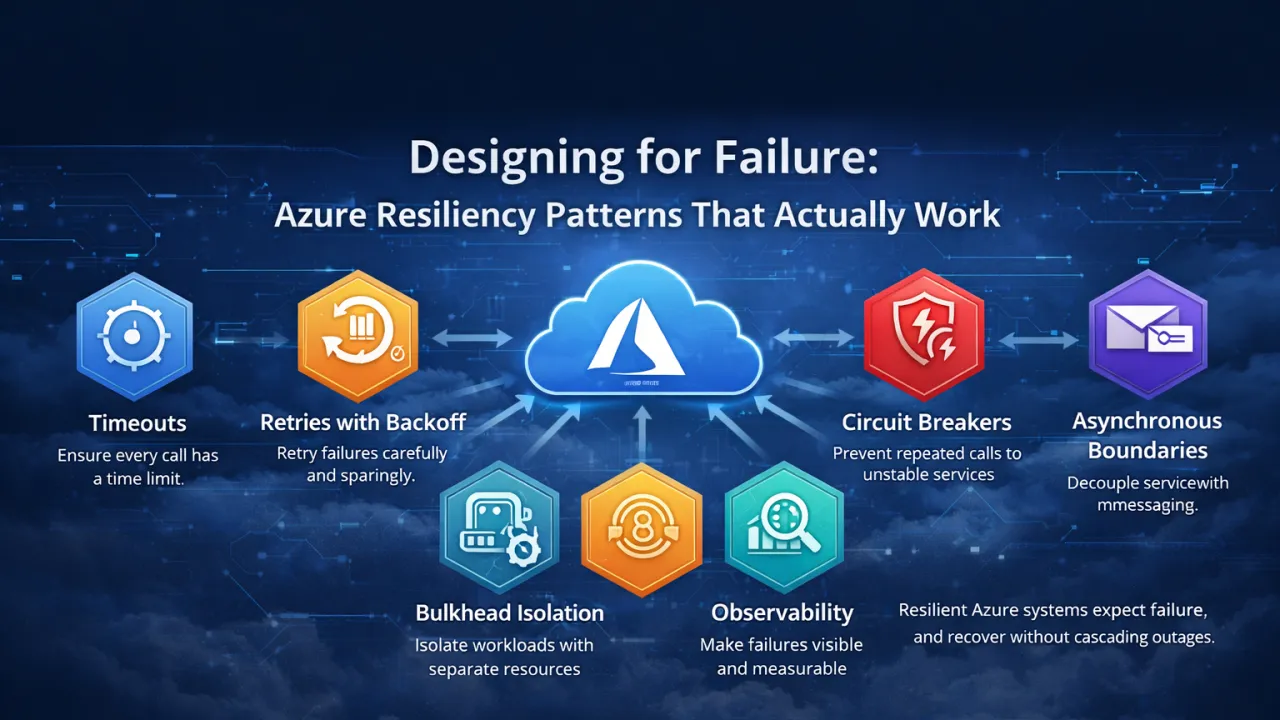
Designing for Failure: Azure Resiliency Patterns That Actually Work

In cloud-native systems, failure is not an exception—it is a certainty. Azure provides highly available infrastructure, but no platform can eliminate network latency, transient faults, throttling, or dependency outages. The real difference between resilient and fragile systems lies in how applications are designed to respond when failures occur. Designing for failure means accepting that components will break and ensuring the system can absorb, isolate, and recover from those failures without cascading impact.

One of the most effective resiliency principles in Azure systems is failing fast with clear boundaries. Timeouts are not optional in distributed systems; they are essential. Without explicit timeouts, slow dependencies silently consume threads and resources until the system collapses under load. Well-designed Azure applications define strict timeout policies and treat delayed responses as failures, allowing the system to recover or degrade gracefully rather than stall indefinitely.

Retries are another powerful but frequently misused resiliency pattern. Blind or aggressive retries often amplify failures instead of resolving them, especially during partial outages. Resilient Azure systems apply retries selectively, using exponential backoff and jitter, and only for operations that are safe to repeat. Combined with circuit breakers, retries become a controlled recovery mechanism rather than a source of cascading failure.

Asynchronous communication is also a cornerstone of resilient design. Synchronous request chains tightly couple services and propagate failures instantly across the system. By introducing asynchronous boundaries—such as messaging or background processing—Azure systems can absorb spikes, decouple dependencies, and continue operating even when downstream services are unavailable. Failures become backlogs to process later, not immediate outages.

Isolation further strengthens resiliency by preventing one failing component from impacting others. Techniques such as bulkhead isolation ensure that critical workloads are protected from less important tasks. In Azure environments, this often means separating resources, queues, or compute for high-priority traffic so that non-essential failures do not degrade the entire system.

Finally, observability is what makes resiliency actionable. Without clear visibility into failures, retries, and degraded behavior, systems fail silently and unpredictably. Resilient Azure systems invest heavily in structured logging, distributed tracing, and meaningful alerts, enabling teams to detect issues early and respond before users are affected.

Designing for failure is not about pessimism—it’s about realism. Azure resiliency patterns work best when they are applied intentionally, consistently, and early in the design process. Systems that embrace failure as a design constraint don’t just survive incidents—they recover quickly, degrade gracefully, and earn long-term trust from both users and operators.

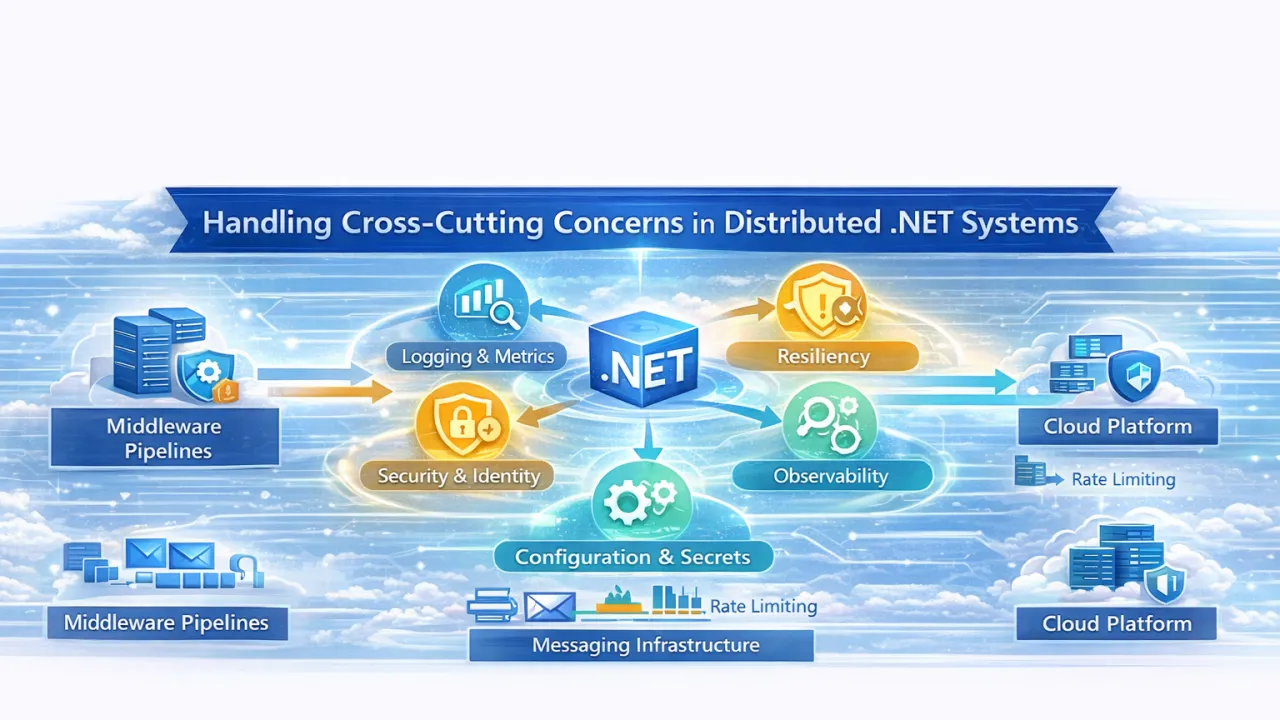
Handling Cross-Cutting Concerns in Distributed .NET Systems

As .NET applications evolve into distributed systems—spanning microservices, APIs, background workers, and serverless components—certain concerns begin to appear everywhere. Logging, security, resiliency, observability, configuration, and error handling cut across every service and every layer.

These are known as cross-cutting concerns, and in distributed systems, handling them poorly is one of the fastest ways to create fragile, inconsistent, and hard-to-operate platforms.

This article explores how to handle cross-cutting concerns effectively in distributed .NET systems, what commonly goes wrong, and which patterns actually work at scale.

🧠 What Are Cross-Cutting Concerns?

Cross-cutting concerns are aspects of a system that:

  • Affect multiple components
  • Are not part of core business logic
  • Must be applied consistently across services

In distributed .NET systems, common cross-cutting concerns include:

  • Logging and monitoring
  • Authentication and authorization
  • Error handling and retries
  • Configuration and secrets
  • Tracing and diagnostics
  • Rate limiting and throttling

The challenge isn’t implementing them—it’s implementing them once, consistently, and correctly across a distributed landscape.

The Most Common Mistake: Handling Them Inside Business Logic

A common failure pattern looks like this:

  • Each service implements its own logging style
  • Retry logic is copy-pasted inconsistently
  • Authentication rules differ per API
  • Errors are handled differently everywhere
  • Configuration is scattered across codebases

This leads to:

  • Inconsistent behavior
  • Security gaps
  • Difficult debugging
  • High maintenance overhead
  • Increased cognitive load for teams

In distributed systems, inconsistency is more dangerous than missing features.

🧩 Principle 1: Push Cross-Cutting Concerns to the Edges

The most effective strategy is to move cross-cutting concerns out of business logic and into shared infrastructure layers.

In .NET systems, this typically means:

  • Middleware pipelines
  • API gateways
  • Messaging infrastructure
  • Platform-level tooling

Business logic should focus on what the system does, not how it logs, retries, or authenticates.

🔐 Security as a Cross-Cutting Concern

Authentication and authorization should be:

  • Centralized
  • Declarative
  • Consistent across services

In distributed .NET systems:

  • APIs should trust validated identities
  • Services should not re-implement auth logic
  • Authorization should be policy-based, not hard-coded

Handling security at the boundary (API gateway, identity provider, platform configuration) reduces duplication and risk.

🔁 Resiliency: Retries, Timeouts, and Circuit Breakers

Failures are normal in distributed systems:

  • Networks fail
  • Services restart
  • Dependencies throttle

Resiliency must be designed, not patched.

Effective .NET systems:

  • Apply retries with exponential backoff
  • Use timeouts consistently
  • Protect dependencies with circuit breakers
  • Avoid retry storms

These behaviors should be standardized—preferably through shared libraries or platform conventions—rather than implemented ad-hoc per service.

📊 Observability: Logging, Metrics, and Tracing

In monoliths, debugging often meant checking logs. In distributed systems, logs alone are not enough.

Effective observability requires:

  • Structured logging
  • Correlation IDs
  • Distributed tracing
  • Consistent metrics

Every request should be traceable across service boundaries. Without this, diagnosing production issues becomes guesswork.

Observability is not a feature—it’s an operational requirement.

Configuration & Secrets Management

Configuration becomes harder as systems scale:

  • Environment differences
  • Secret rotation
  • Service-specific settings

Anti-patterns include:

  • Hard-coded values
  • Secrets in source control
  • Environment-specific code paths

Well-designed .NET systems:

  • Externalize configuration
  • Centralize secrets
  • Treat configuration as data, not code
  • Support dynamic updates where possible

This keeps deployments predictable and secure.

🧠 Principle 2: Prefer Platform Capabilities Over Custom Code

One of the biggest mistakes teams make is re-implementing cross-cutting concerns repeatedly.

In distributed .NET systems, many concerns are better handled by:

  • The hosting platform
  • Shared infrastructure
  • Standardized middleware
  • Proven libraries

Custom implementations increase risk, maintenance cost, and inconsistency—especially as teams and services grow.

Centralization vs Autonomy: Finding the Balance

Not everything should be centralized blindly.

Good rules of thumb:

  • Centralize policies and standards
  • Decentralize business decisions
  • Standardize behavior, not implementation details

Cross-cutting concerns should enable teams—not constrain them.

🏁 Final Thoughts

Handling cross-cutting concerns well is one of the strongest indicators of a mature distributed .NET system.

When done right:

  • Business logic stays clean
  • Services behave consistently
  • Failures are visible and manageable
  • Security is predictable
  • Teams move faster with less risk

When done poorly:

  • Every service becomes a snowflake
  • Debugging turns into archaeology
  • Reliability erodes over time

In distributed systems, architecture isn’t defined by business logic—it’s defined by how cross-cutting concerns are handled.

Treat them as first-class architectural decisions, not implementation details, and your .NET systems will scale not just technically—but operationally and organizationally as well.

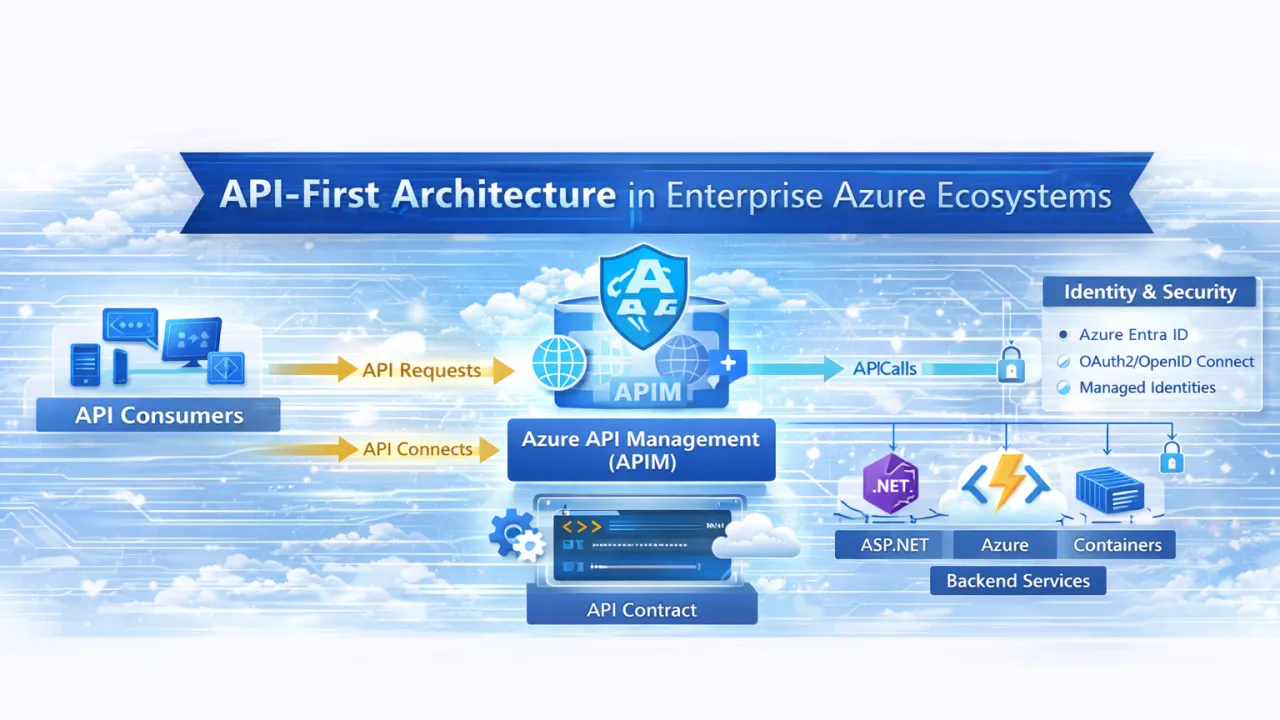
API-First Architecture in Enterprise Azure Ecosystems

In modern enterprise Azure ecosystems, APIs are no longer just technical integration points—they are the primary interface through which systems, teams, and partners interact. As organizations scale, the number of consumers, platforms, and dependencies grows rapidly. Without a clear API strategy, this growth leads to tight coupling, fragile integrations, and slow delivery. API-first architecture addresses this challenge by treating APIs as first-class products rather than implementation by-products.

An API-first approach means designing the API contract before writing any business logic. Instead of exposing internal structures or database models, teams define clear, stable contracts that represent business capabilities. These contracts become the foundation for development, enabling backend services, frontend applications, and external consumers to evolve independently. In large Azure environments, this contract-driven model significantly reduces integration friction and prevents breaking changes from cascading across systems.

One of the biggest advantages of API-first architecture in Azure is organizational scalability. Enterprise platforms often involve multiple teams working in parallel. When APIs are well-designed and governed, teams can build, test, and deploy independently without constantly coordinating changes. Azure API Management (APIM) plays a central role here by acting as the unified entry point for APIs, enforcing security, throttling, versioning, and providing visibility into usage and performance.

Security is another area where API-first architecture proves critical. In enterprise systems, APIs define the boundary of trust. By centralizing authentication and authorization at the API layer—using Azure Entra ID, OAuth 2.0, and managed identities—organizations ensure consistent security policies across all consumers. This avoids the common anti-pattern of duplicating security logic inside every service, which often leads to inconsistencies and vulnerabilities.

API-first architecture also enables safe evolution over time. Enterprise APIs tend to live far longer than individual applications. When APIs are versioned intentionally and treated as long-term commitments, teams can introduce new capabilities without disrupting existing consumers. This stability builds trust across the organization and allows systems to modernize incrementally—whether by introducing microservices, serverless components, or legacy integrations behind the same API surface.

Importantly, API-first does not mean API-only. In mature Azure ecosystems, APIs often work alongside event-driven architectures. APIs handle commands and queries—explicit requests for data or actions—while events communicate outcomes and state changes asynchronously. This combination allows enterprises to build systems that are both predictable and scalable, without overloading APIs with responsibilities they were never meant to handle.

Ultimately, API-first architecture is not a tooling decision—it’s a mindset shift. It requires teams to think beyond their own codebases and consider consumers, longevity, governance, and change as core design concerns. Enterprises that adopt API-first principles on Azure gain more than clean integrations; they build platforms that are easier to scale, safer to evolve, and better aligned with long-term business growth.

In large Azure ecosystems, APIs are not just connectors—they are the architecture.

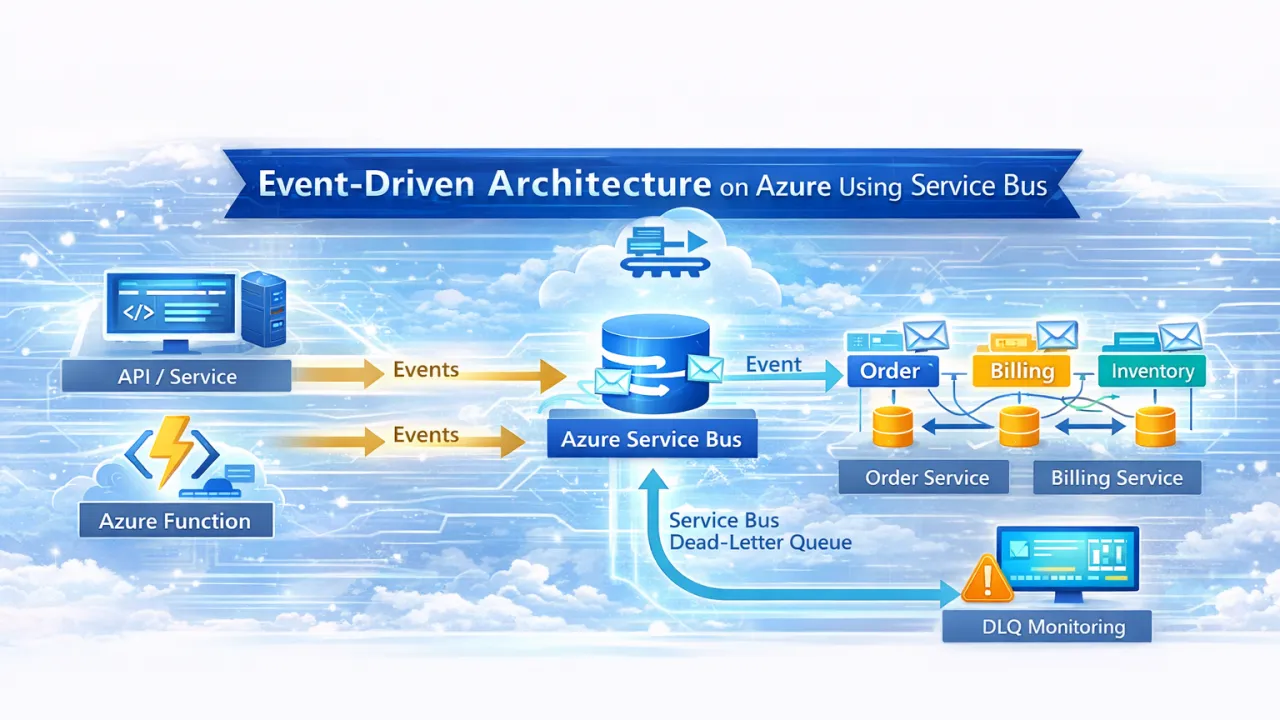
Event-Driven Architecture on Azure Using Service Bus

As systems grow in scale and complexity, tightly coupled, synchronous architectures start to crack. Small failures cascade. Scaling becomes inefficient. Teams slow each other down.

This is where Event-Driven Architecture (EDA) becomes a powerful design choice—and Azure Service Bus is one of the most reliable foundations for building it.

In this article, we explore how to design event-driven systems on Azure using Service Bus, when to use it, common mistakes to avoid, and how it fits into modern .NET and cloud-native architectures.

🧠 What Is Event-Driven Architecture?

Event-Driven Architecture is a model where:

  • Producers emit events (something happened)
  • Consumers react to those events asynchronously
  • Systems are loosely coupled and independently scalable

Instead of asking:

“Can you do this right now?”

Systems say:

“This happened—do what you need, when you’re ready.”

This shift dramatically improves resilience, scalability, and autonomy.

Why Azure Service Bus for Event-Driven Systems?

Azure offers multiple messaging options (Service Bus, Event Grid, Storage Queues). Service Bus is designed for enterprise-grade messaging where reliability and control matter.

Key strengths of Azure Service Bus

  • Guaranteed message delivery
  • At-least-once processing
  • Message ordering (sessions)
  • Dead-letter queues
  • Transactions
  • Fine-grained retry and lock control
  • Secure, private networking support

Service Bus is ideal when:

  • Losing messages is unacceptable
  • Processing is critical to business workflows
  • You need control over retries and failures

🧩 Core Building Blocks of Service Bus

1️ Queues – Point-to-Point Messaging

  • One message → one consumer
  • Ideal for background processing and workflows
  • Natural load leveling

Use cases

  • Order processing
  • Payment handling
  • Job execution
  • Workflow steps

2️ Topics & Subscriptions – Publish/Subscribe

  • One event → multiple subscribers
  • Each consumer gets its own copy
  • Enables system fan-out

Use cases

  • Domain events
  • Integration events
  • Multiple downstream reactions

Example:

OrderPlaced → Billing, Inventory, Notifications, Analytics

3️ Dead-Letter Queues (DLQ)

Messages land in DLQ when:

  • Processing fails repeatedly
  • Validation fails
  • TTL expires

DLQ is not an error—it’s a control mechanism.

Every production system must monitor and handle DLQs intentionally.

🏗 Designing Event-Driven Systems on Azure

🔹 Define Clear Event Contracts

Events should:

  • Represent facts (“OrderPlaced”, not “CreateOrder”)
  • Be immutable
  • Be versioned
  • Avoid leaking internal models

Bad event design is the #1 cause of brittle event systems.

🔹 Prefer Asynchronous Boundaries

Avoid synchronous calls between services when:

  • The consumer doesn’t need immediate feedback
  • Reliability matters more than speed
  • Scaling independently is important

Service Bus introduces temporal decoupling, which improves resilience.

🔹 Design for Idempotency

Service Bus guarantees at-least-once delivery, not exactly-once.

Consumers must safely handle duplicate messages by:

  • Tracking message IDs
  • Using idempotent database operations
  • Designing side-effect-safe handlers

This is non-negotiable in production systems.

Azure Service Bus + .NET (Practical Patterns)

In .NET-based systems, Service Bus is commonly used with:

  • ASP.NET APIs
  • Azure Functions
  • Background worker services
  • Containerized microservices

Common patterns

  • API publishes event → Service Bus topic
  • Background worker processes messages
  • Azure Functions scale consumers automatically
  • Long workflows coordinated with Durable Functions

Service Bus acts as the backbone of asynchronous communication.

Common Mistakes Teams Make

1️ Treating Service Bus Like a Database

Service Bus is not:

  • A data store
  • A replay system
  • A replacement for persistence

Events should be transient signals, not long-term state.

2️ Over-Chattiness

Emitting too many fine-grained events leads to:

  • Noisy systems
  • Hard-to-understand flows
  • Unstable contracts

Prefer meaningful business events, not technical noise.

3️ Ignoring Monitoring & DLQs

Many Azure systems fail quietly because:

  • No DLQ monitoring exists
  • Failed messages pile up unnoticed
  • Teams discover issues days later

Event-driven systems demand strong observability.

🔐 Security & Reliability Considerations

Production-ready Service Bus systems should include:

  • Managed identities (no secrets)
  • Private endpoints where required
  • Retry policies with exponential backoff
  • Circuit breakers on consumers
  • Message size and TTL governance

Reliability is an architectural decision—not a configuration checkbox.

When NOT to Use Service Bus

Service Bus may be the wrong choice when:

  • Events are purely reactive UI notifications → use Event Grid
  • Throughput is extremely high with minimal guarantees → consider Event Hubs
  • Simple, low-critical background jobs → Storage Queues may suffice

Choosing Service Bus means choosing correctness over convenience.

🏁 Final Thoughts

Event-Driven Architecture isn’t about adding messaging—it’s about changing how systems communicate.

Azure Service Bus enables teams to:

  • Decouple services safely
  • Scale independently
  • Build resilient workflows
  • Handle failure gracefully
  • Evolve systems without breaking others

But success requires discipline:

  • Thoughtful event design
  • Strong consumer logic
  • Observability from day one

If microservices are the structure, events are the nervous system.

Used correctly, Azure Service Bus becomes the backbone of reliable, scalable, cloud-native systems.

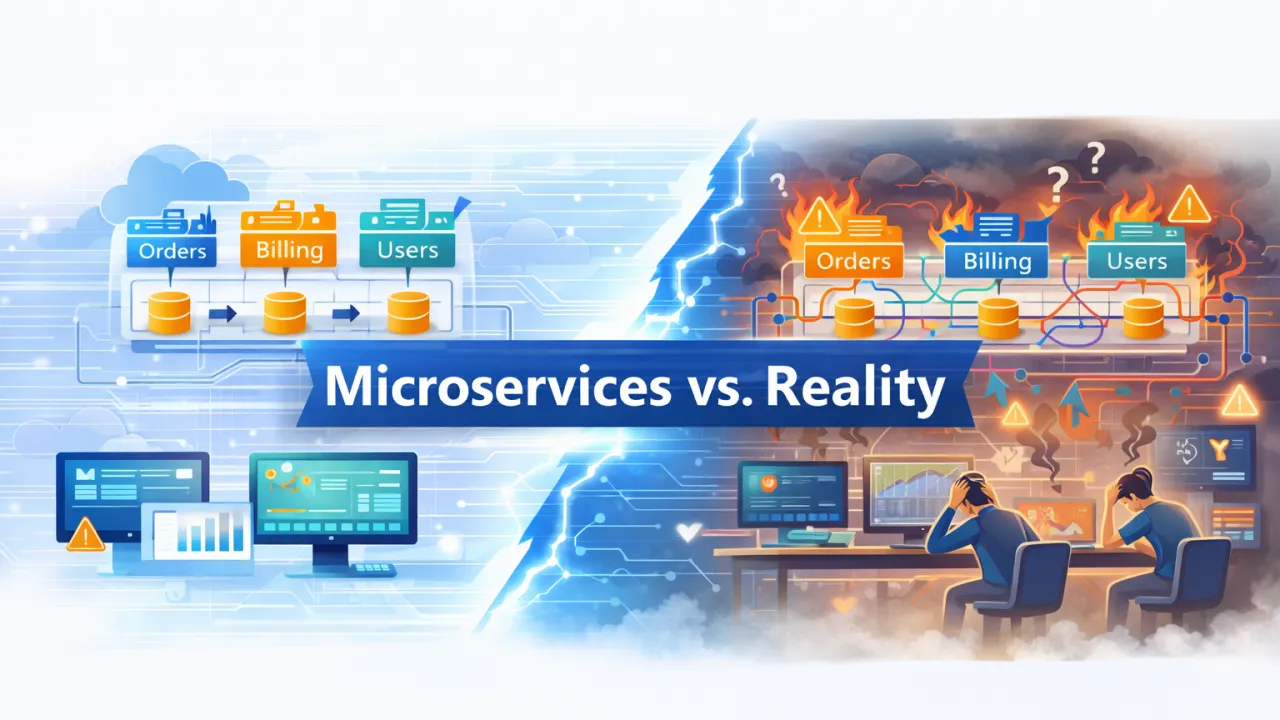
When NOT to Use Microservices (Lessons from Large Azure Systems)

Microservices are often presented as the default architecture for modern cloud systems. Conferences promote them. Blog posts praise them. Architecture diagrams glorify them.

Yet in many large Azure environments, microservices are responsible for slower delivery, higher costs, fragile systems, and exhausted teams.

The problem isn’t microservices themselves—it’s using them when they’re not needed.

This article shares hard-earned lessons from large Azure systems and explains when microservices are the wrong choice, what to use instead, and how to avoid turning your architecture into a distributed problem factory.

🧠 The Core Truth About Microservices

Microservices optimize for:

  • Team autonomy
  • Independent deployment
  • Independent scaling
  • Organizational complexity

They do not optimize for:

  • Simplicity
  • Speed of early development
  • Low operational overhead
  • Small or evolving teams

If your problem doesn’t demand the first set, microservices will punish you with the second.

1. When Your Domain Is Not Clearly Understood

Microservices require stable, well-defined boundaries.

In large Azure systems, the most common failure pattern looks like this:

  • Business rules are still evolving
  • Domain boundaries are unclear
  • Teams guess service boundaries early
  • Changes require constant cross-service refactoring

This leads to:

  • Excessive synchronous calls
  • Chatty APIs
  • Tight coupling over the network
  • Frequent breaking changes

What Works Better

  • Start with a modular monolith
  • Discover boundaries through real usage
  • Refactor internally before distributing externally

If boundaries are unstable inside one codebase, they will be chaos across services.

2. When You Don’t Have Strong DevOps & Observability

Microservices dramatically increase operational surface area:

  • Multiple deployments
  • Distributed failures
  • Network latency
  • Versioning complexity
  • Security boundaries everywhere

In many Azure environments, teams adopt microservices before they have:

  • Centralized logging
  • Distributed tracing
  • Reliable CI/CD
  • Automated rollbacks
  • Alerting discipline

The result? Failures become invisible, debugging becomes guesswork, and teams lose confidence in production.

What Works Better

  • Fewer deployables
  • Centralized monitoring
  • Strong pipelines first
  • Observability before distribution

Microservices multiply both good practices and bad ones.

3. When You Have a Small or Tightly Coupled Team

Microservices shine when:

  • Teams are independent
  • Ownership is clear
  • Communication overhead is manageable

In real Azure projects, many teams are:

  • 3–6 developers
  • Sharing responsibilities
  • Context-switching frequently
  • Supporting production and features simultaneously

In this scenario, microservices create:

  • Coordination overhead
  • More meetings
  • More deployments
  • More failure points

What Works Better

  • Modular monolith
  • Clear internal module ownership
  • Fewer moving parts
  • Faster feedback loops

Microservices optimize for organizational scale, not team size.

4. When You Need Strong Consistency & Transactions

Many enterprise systems require:

  • Strong consistency
  • Multi-step transactions
  • Clear data integrity
  • Predictable workflows

In large Azure systems, microservices introduce:

  • Distributed transactions
  • Eventual consistency
  • Complex compensating logic
  • Difficult edge cases

These problems are architectural, not tooling issues.

What Works Better

  • Single transactional boundary
  • Centralized data ownership
  • Explicit workflows
  • Simpler failure handling

Eventual consistency is powerful—but only when the business can tolerate it.

5. When Cost Predictability Matters

Microservices often increase:

  • Infrastructure costs
  • Networking charges
  • Monitoring overhead
  • Idle compute waste

In Azure, this shows up as:

  • Dozens of underutilized services
  • Complex scaling rules
  • Unexpected egress and messaging costs

For many systems, the ROI simply isn’t there.

What Works Better

  • Fewer services
  • Shared infrastructure
  • Predictable scaling
  • Cost visibility

Cloud-native doesn’t mean cloud-expensive.

6. When You’re Chasing Trends Instead of Solving Problems

One of the most dangerous reasons teams adopt microservices:

“This is how modern systems are built.”

In large Azure systems, this mindset leads to:

  • Over-engineering
  • Architecture for hypothetical scale
  • Premature distribution
  • Fragile systems that are hard to change

A Better Question to Ask

What problem does microservices solve for us right now?

If you can’t answer that clearly, you’re not ready.

Microservices ARE the Right Choice When…

To be clear—microservices do make sense when:

  • You have multiple independent teams
  • Domain boundaries are stable
  • Independent scaling is required
  • Deployment velocity is critical
  • You have strong platform engineering
  • Observability is mature

They are a scaling strategy, not a default architecture.

🏁 Final Thoughts

Large Azure systems don’t fail because microservices are bad. They fail because microservices are used too early, too broadly, and without the necessary maturity.

The most successful teams:

  • Start simple
  • Build strong modular foundations
  • Invest in tooling and observability
  • Let architecture evolve
  • Use microservices intentionally—not emotionally

If microservices don’t remove a real constraint, they will create new ones.

Cloud-native architecture is about clarity, discipline, and trade-offs—not trends.

Monolith → Modular Monolith → Microservices: A Practical Azure Journey

Modernizing applications is rarely a straight jump from a legacy monolith to microservices. Yet many teams try to make that leap—and pay the price in complexity, instability, and operational overhead.

The truth is simpler: microservices are an outcome, not a starting point.

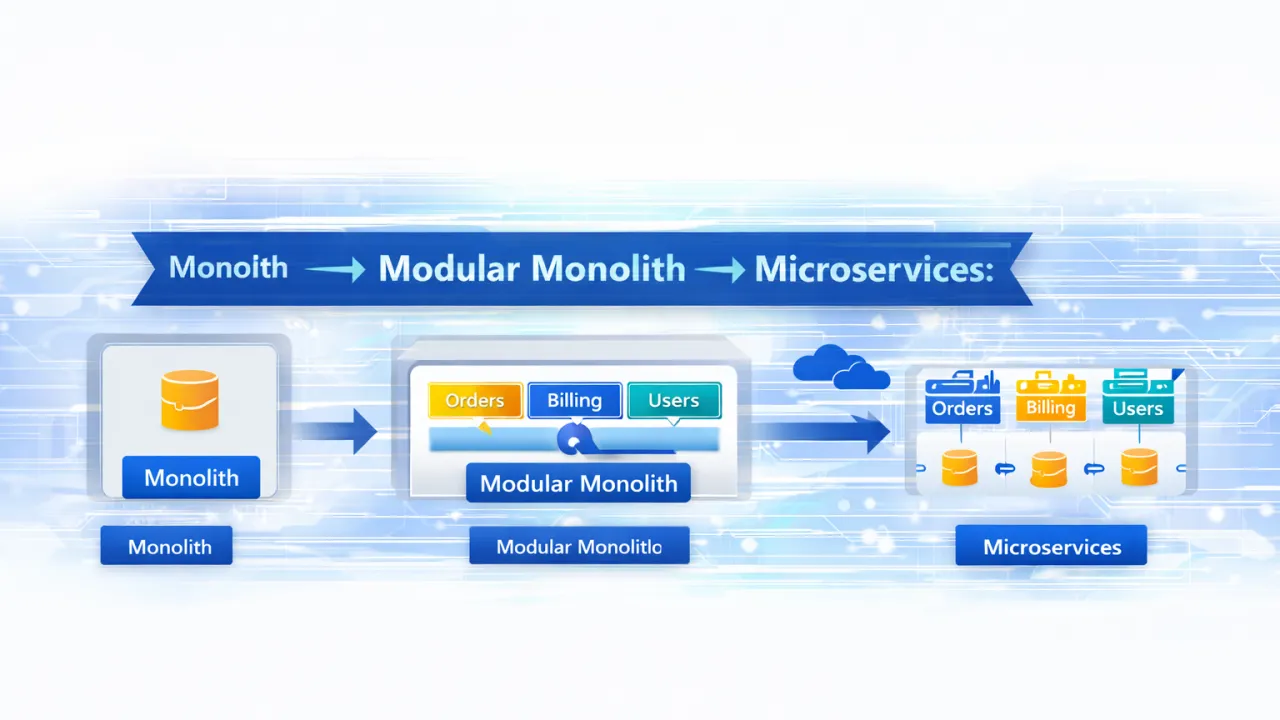
This article outlines a practical, Azure-friendly modernization journey that most successful teams follow: Monolith → Modular Monolith → Microservices Each stage has a purpose, benefits, and clear signals for when to move forward.

🧱 Stage 1: The Monolith (Where Most Teams Begin)

A monolithic application is a single deployable unit where:

  • UI, business logic, and data access are tightly coupled
  • Scaling happens as a whole
  • A single failure can impact the entire system

Despite its reputation, the monolith isn’t inherently bad.

Why Monoliths Still Make Sense

  • Simple to develop and deploy early on
  • Easy local debugging
  • Lower operational complexity
  • Faster initial delivery

Where Monoliths Break Down

As systems grow, teams start to feel pain:

  • Small changes require full redeployments
  • Teams step on each other’s code
  • Scaling is inefficient
  • Long release cycles
  • Increasing blast radius of failures

This is usually where teams start thinking about microservices—but jumping straight there is often a mistake.

🧩 Stage 2: The Modular Monolith (The Most Skipped—but Most Important—Step)

A modular monolith is still one deployable application, but internally it is:

  • Logically separated into well-defined modules
  • Enforced by code boundaries, not conventions
  • Designed around business capabilities, not technical layers

This is the most critical phase of the journey.

🔑 Characteristics of a Modular Monolith

  • Clear module boundaries (e.g., Orders, Billing, Users)
  • Each module owns its domain logic
  • Minimal cross-module dependencies
  • Communication via interfaces, not shared data models
  • No direct database access across modules

🧠 Why This Step Matters

If you can’t define clean boundaries inside a monolith, microservices will magnify the problem.

A modular monolith helps teams:

  • Discover true domain boundaries
  • Reduce coupling safely
  • Improve testability
  • Prepare teams for distributed thinking
  • Avoid premature network calls

🛠 Azure-Friendly Implementation

In a .NET + Azure environment:

  • Use solution-level modularization
  • Apply Domain-Driven Design (DDD) concepts
  • Enforce boundaries via assemblies and access rules
  • Centralized deployment (App Service, Container Apps)

At this stage, you gain 80% of the benefits people expect from microservices—with 20% of the complexity.

🚀 Stage 3: Microservices (When—and Only When—it Makes Sense)

Microservices are independently deployable services that:

  • Own their data
  • Scale independently
  • Communicate over the network
  • Are operated and monitored separately

They shine only when the organization and architecture are ready.

Signs You’re Ready for Microservices

  • Stable, well-understood module boundaries
  • Independent teams aligned to business capabilities
  • Clear scaling or reliability needs per module
  • Strong CI/CD practices
  • Observability already in place
  • Operational maturity exists

Common Anti-Patterns

  • Microservices created by technical layers
  • Shared databases across services
  • Excessive synchronous communication
  • Distributed monoliths
  • “Microservices because everyone else does it”

Azure Microservices Stack (Practical, Not Fancy)

  • Azure Container Apps or AKS for services
  • Azure Service Bus / Event Grid for async communication
  • Azure API Management for external access
  • Azure Monitor + Application Insights for observability
  • Managed identities for security

Microservices should simplify scaling and team autonomy, not complicate development.

🔄 Migration Strategy: How to Move Safely

Step-by-Step Approach

  1. Stabilize the monolith
  2. Refactor toward a modular monolith
  3. Enforce boundaries strictly
  4. Extract one module at a time
  5. Start with low-risk, high-value services
  6. Use async messaging to decouple
  7. Measure operational impact continuously

There is no “big bang” migration. Successful teams move incrementally and intentionally.

Trade-Offs to Acknowledge

Microservices introduce:

  • Network latency
  • Operational overhead
  • Deployment complexity
  • Distributed debugging challenges

They are not a free upgrade. They are a trade-off—worth it only when the benefits outweigh the cost.

🏁 Final Thoughts

Modernization is a journey, not a destination.

The most successful Azure teams don’t rush into microservices. They:

  • Start with clarity
  • Build strong modular foundations
  • Let architecture evolve naturally
  • Optimize for team productivity and system resilience

If you remember one thing, let it be this:

If your monolith isn’t modular, your microservices won’t be either.

Cloud-native architecture isn’t about how many services you deploy—it’s about how intentionally you design boundaries.