Prilixor

Understanding Security Boundaries in Azure: Where Trust Actually Ends

In an era dominated by rapid digital transformation, understanding security boundaries in cloud environments has never been more crucial. Azure, one of the leading cloud service providers, offers a plethora of tools and services designed to enhance security. However, it's imperative to acknowledge that even the most sophisticated systems have limitations. Trust and security boundaries define where end-to-end protections end and where potential vulnerabilities may arise.

Security boundaries in Azure revolve around several key concepts, including identity management, data protection, and the shared responsibility model. Each of these components plays a significant role in shaping the overall security landscape. By understanding these boundaries, organizations can better frame their risk management strategies and enhance their security postures.

Firstly, identity management represents a primary security boundary. Azure Active Directory offers a comprehensive identity and access management solution, allowing organizations to define who has access to what resources. However, this trust is not absolute. Weak passwords, social engineering attacks, and insider threats pose vulnerabilities. Thus, organizations must continuously monitor identity behaviors and implement robust multi-factor authentication.

Data protection is another crucial area. Azure provides a variety of tools to secure data at rest and in transit. Encryption plays an essential role here, yet it’s vital to remember that organizations share the responsibility for securing sensitive data. While Azure protects the physical infrastructure, the responsibility to encrypt data before it enters the cloud often lies with the organization. This duality of responsibility reinforces the need for ongoing training and awareness regarding data security practices among employees.

The shared responsibility model further highlights the importance of understanding security boundaries. In this framework, Azure is responsible for the security of the cloud infrastructure, while organizations must secure the applications and data they deploy. Here are a few essential insights about the shared responsibility model:

  • Azure safeguards the infrastructure, but user-configured settings can create vulnerabilities.
  • Regular reviews of security configurations are necessary to prevent misconfigurations.
  • Updates and patches to software applications are the organization's responsibility.
  • Continuous monitoring of access logs can yield insights into potential security breaches.

In conclusion, the effectiveness of Azure's security measures significantly depends on the decisions made by organizations. Navigating the complexities of security boundaries requires a holistic approach, combining technology with robust governance frameworks. Organizations must set clear boundaries and continuously reassess their security measures to ensure that trust does not become a vulnerability. By understanding where trust ends and vigilance begins, businesses can fortify their defenses against the evolving landscape of cyber threats.

Secrets, Configurations, and Feature Flags – Azure Best Practices

In modern cloud applications, managing secrets, configurations, and feature flags is not just a setup task — it’s a critical part of system design.

Many applications still mix these concerns together: Hardcoded values. Secrets in config files. Feature toggles hidden in code.

This leads to security risks, deployment friction, and poor flexibility.

In Azure-based systems, separating these concerns properly is essential.

The Three Different Responsibilities

These are often confused — but they serve very different purposes:

  • Secrets → Sensitive data (API keys, connection strings, tokens) • Configurations → Environment-specific values (URLs, settings, limits) • Feature Flags → Runtime behavior control (enable/disable features)

Treating them the same leads to fragile systems.

Secrets: Never Store, Always Retrieve

Secrets should never live inside your codebase or config files.

Best practice in Azure:

  • Use Azure Key Vault • Access secrets via Managed Identity • Avoid storing secrets in appsettings.json or environment variables • Enable automatic rotation where possible

Secrets should be fetched securely at runtime — not stored.

Configurations: Externalize Everything

Configurations define how your app behaves in different environments.

Best practice:

  • Use Azure App Configuration or environment variables • Keep configs outside the codebase • Separate dev, staging, and production values • Support dynamic reload without redeployment

Your application should adapt to environments — not be tied to them.

Feature Flags: Control Without Deployment

Feature flags allow you to change behavior without redeploying code.

Use cases include:

  • Gradual feature rollouts • A/B testing • Turning off faulty features instantly • Testing in production safely

In Azure, feature flags integrate directly with App Configuration.

Why This Separation Matters

When done correctly, you get:

  • Stronger security (no exposed secrets) • Faster deployments (no config changes in code) • Safer releases (controlled feature rollouts) • Better operational flexibility

When done poorly, you get:

  • Risk of secret leaks • Frequent redeployments • Hard-to-control production behavior

Common Mistakes

Many teams still:

  • Store secrets in config files • Mix configs and feature flags together • Hardcode environment-specific values • Redeploy apps for small configuration changes

These patterns slow down development and increase risk.

The Real Insight

Modern cloud applications are not static — they are dynamic.

Your system should allow you to:

  • Change behavior without redeploying • Secure access without exposing credentials • Adapt environments without rewriting code

Secrets, configurations, and feature flags are not just tools — they are control mechanisms for modern systems.

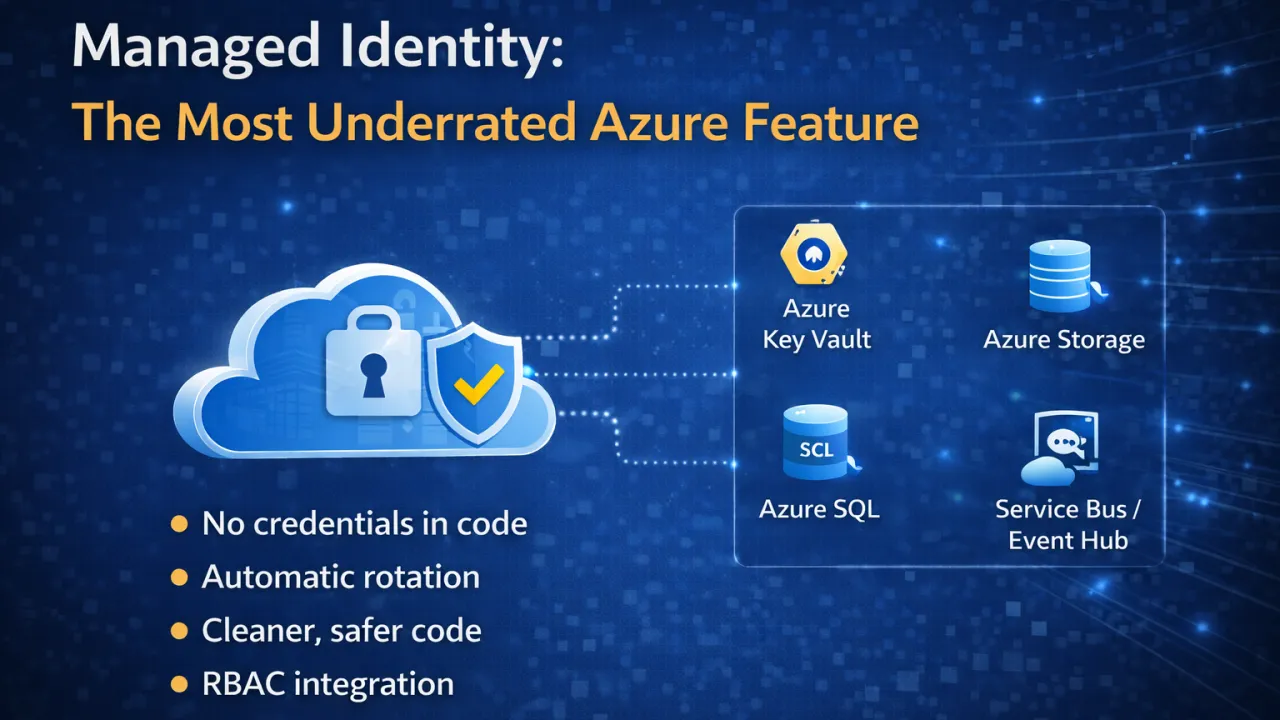
Managed Identity: The Most Underrated Azure Feature

In many cloud applications, one of the biggest risks is not performance or scalability — it’s how we handle credentials.

API keys in code. Connection strings in config files. Secrets stored in environment variables.

Even today, many systems rely on manually managed credentials — and that’s where problems begin.

This is exactly what Managed Identity solves.

What Is Managed Identity?

Managed Identity in Azure allows your application to authenticate with Azure services without storing credentials in code.

Instead of managing secrets yourself, Azure handles identity creation and lifecycle automatically.

Your application simply says: “I need access to this resource.” Azure verifies identity behind the scenes.

No keys. No secrets. No manual rotation.

Why It Matters

Traditional credential management introduces:

  • Security risks (leaked keys, exposed configs) • Operational overhead (rotation, storage, access control) • Human error (misconfigured permissions)

Managed Identity removes these problems by design.

How It Works (Simple View)

When you enable Managed Identity for a service (App Service, VM, Container Apps, etc.):

  1. Azure creates an identity for your resource
  2. You assign permissions (RBAC) to that identity
  3. Your application requests access via Azure SDK
  4. Azure issues tokens securely

No credentials are ever exposed to your application code.

Where You Should Use It

Managed Identity is ideal when your app needs to access:

  • Azure Key Vault • Azure Storage • Azure SQL Database • Service Bus / Event Hub • Any Azure resource with RBAC support

If your app talks to Azure — you should consider using it.

Benefits in Real Systems

Using Managed Identity leads to:

  • Stronger security posture • Zero secret management • Automatic credential rotation • Cleaner and safer code • Easier compliance and auditing

It aligns perfectly with Zero Trust architecture.

Common Mistakes

Despite its advantages, many teams:

  • Continue using connection strings unnecessarily • Store secrets in config files • Avoid Managed Identity due to lack of awareness • Overcomplicate authentication setups

In most cases, the simpler and safer option already exists — but goes unused.

The Real Insight

Managed Identity is not just a feature — it’s a shift in how we think about authentication.

Instead of managing secrets, we rely on identity and access control.

In modern cloud systems, security should not depend on how well you hide secrets. It should depend on how well you eliminate them.

Securing Your ASP.NET Core Web APIs: A Deep Dive into JWT & OAuth 2.0

APIs are the gateway to your application’s data and capabilities — and with that comes responsibility. Two standards dominate modern API security: JSON Web Tokens (JWT) for stateless authentication and OAuth 2.0 for delegated authorization. Used together (or independently when appropriate), they enable scalable, secure identity and access control for ASP.NET Core Web APIs.

This guide explains the concepts, how they fit together, and practical best practices for production-ready API security — no code required.

1. Authentication vs Authorization — the quick distinction

  • Authentication answers “Who are you?” — confirming identity. JWT is commonly used here.
  • Authorization answers “What can you do?” — controlling access to resources. OAuth 2.0 handles delegated authorization and scopes.

Understanding both is essential: authentication provides a token that proves identity; authorization decides which operations that identity may perform.

2. JWT — what it is and when to use it

JSON Web Token (JWT) is a compact, URL-safe token format that encodes claims (user id, roles, expiry, etc.) and is digitally signed.

Why JWT:

  • Stateless: server doesn’t need to store session state — ideal for horizontally scaled services.
  • Compact & portable: easy to send in HTTP headers.
  • Interoperable: supported across languages and platforms.

When to prefer JWT:

  • Microservices or distributed APIs where keeping server-side session state is undesirable.
  • Single Page Apps, mobile clients, or services that need short-lived, verifiable tokens.
  • When you want the token to carry claims usable by downstream services without extra lookups.

Caveats:

  • Tokens are self-contained; if you put too much sensitive data in them, you risk exposure.
  • You must plan for token revocation and rotation since a JWT is valid until it expires (unless you implement revocation patterns).

3. JWT anatomy and security considerations (high level)

A JWT typically has three parts: header, payload (claims), and signature. Important considerations:

  • Signing: Tokens must be signed — either with a symmetric key (HMAC) or an asymmetric pair (RSA/ECDSA). Asymmetric keys provide stronger security and easier rotation across services.
  • Claims: Keep them minimal. Include only what consumers need (e.g., subject, roles, issued/expiry times, audience).
  • Expiry (exp claim): Use short-lived access tokens (minutes). This reduces the risk if a token is leaked.
  • Refresh tokens: Use refresh tokens to obtain new access tokens without forcing frequent logins. Store refresh tokens securely (usually server-side or in a secure, limited-scope storage).
  • Audience and issuer: Validate aud (who the token is for) and iss (who issued it) to prevent token replay across different systems.
  • Transport: Always serve tokens over HTTPS to prevent interception.
  • Storage on clients: Avoid storing access tokens in insecure places (e.g., local storage in browsers) unless mitigations are in place; consider secure, HttpOnly cookies or browser-specific best practices and protections (e.g., same-site cookies, CSRF protections).
  • No sensitive secrets in payload: Never include passwords or secrets in JWT claims — they are base64-encoded, not encrypted, unless you use encrypted JWT (JWE), which is less common.

4. OAuth 2.0 — the right tool for delegated access

OAuth 2.0 is an authorization framework designed for delegating limited access to protected resources. It defines roles and flows:

  • Roles: Resource Owner (user), Client (app), Authorization Server (auth provider), Resource Server (API).
  • Common flows:

OAuth 2.0 gives you:

  • Scopes: fine-grained permissions (e.g., read:orders, write:orders).
  • Delegation: allows third-party apps to act on behalf of users without sharing credentials.
  • Standardized token lifecycle: access tokens (short-lived) + refresh tokens.

Use OAuth when:

  • Third-party apps or services need delegated access.
  • You want a standardized way to issue tokens, manage scopes, consent screens, and revocation.

5. How JWT and OAuth 2.0 work together

A common pattern is:

  1. Authorization Server (OAuth provider) authenticates user and issues an access token (often a JWT) and a refresh token.
  2. Client presents the access token to the Resource Server (your ASP.NET Core API).
  3. Resource Server validates the token and checks claims / scopes to authorize the request.

This separation lets you centralize authentication and authorization decisions (on the Authorization Server) while keeping Resource Servers focused on validating tokens and enforcing policies.

6. Token validation and authorization policies in ASP.NET Core (conceptual)

When your API receives a request with a token, it should:

  • Validate signature: ensure token was issued by a trusted authority.
  • Validate exp: reject expired tokens.
  • Validate audience/issuer: confirm token is meant for your API.
  • Verify scopes/claims: ensure the token has required permissions (scopes) or roles.
  • Enforce fine-grained policies: map claims to authorization requirements (e.g., role-based access, resource ownership checks, claim-based rules).

Authorization policies let you express rules like:

  • “Only users with the admin role can access this endpoint.”
  • “Users can read their own orders but not others’.”

Policies should be declarative and applied consistently across endpoints.

7. Refresh tokens, rotation, and revocation

Short-lived access tokens reduce risk, but users still need a smooth experience. Use refresh tokens to obtain new access tokens. Best practices:

  • Rotate refresh tokens: issue a new refresh token each time one is used; invalidate previous one. This reduces risk from stolen refresh tokens.
  • Protect refresh tokens: treat them as highly sensitive credentials. Store them securely and limit their lifetime and scope.
  • Revoke on suspicious activity: support token revocation (via blacklist or introspection endpoint) for compromised credentials or logout events.

Token revocation is harder with pure stateless JWTs; typical solutions:

  • Maintain a revocation list/blacklist (short-lived entries).
  • Use a token introspection endpoint on the Authorization Server.
  • Use short access token lifetimes and rely on refresh token controls.

8. Additional hardening and operational best practices

Secure transport and headers

  • Always use HTTPS.
  • Apply security headers (CSP, HSTS, X-Frame-Options) as appropriate.

CORS and CSRF

  • Configure CORS strictly to allow only required origins.
  • If you use cookies for tokens, defend against CSRF with anti-forgery measures.

Secret & key management

  • Use a secure secrets store (Key Vault, AWS Secrets Manager) for signing keys and client secrets.
  • Rotate keys regularly and support key identifiers (kid) so older tokens can still be validated after rotation.

Rate limiting and throttling

  • Apply rate limits to protect APIs from abuse and DDoS.
  • Combine with IP-based protections and WAF if needed.

Logging, auditing & observability

  • Log authentication/authorization events (success/failure) without logging raw tokens.
  • Capture metrics: token validation failures, expired token rates, failed logins.
  • Use centralized monitoring and alarms for suspicious spikes.

Least privilege & minimal scopes

  • Issue tokens with the smallest scope necessary for the operation.
  • Enforce least privilege in APIs and resource access.

Defense-in-depth

  • Combine multiple layers: transport security, token validation, authorization policies, input validation, and monitoring.

9. Common mistakes & how to avoid them

  • Long-lived access tokens — increase exposure window. Use short-lived access tokens and refresh tokens with controls.
  • Storing tokens insecurely on clients — use platform-specific secure storage.
  • Failing to validate aud or iss — allows tokens intended for other resources to be used.
  • Embedding sensitive data in JWT claims — anyone with token can read claims unless encrypted.
  • No key rotation plan — makes compromise long-lasting.
  • Mixing authentication and authorization logic on the server — keep roles, claims, and policies clear and documented.

10. Deployment & production checklist (quick)

  1. Enforce HTTPS site-wide.
  2. Short-lived access tokens + secure refresh tokens.
  3. Validate signature, expiry, audience, and issuer on every request.
  4. Store signing keys in a secure vault and rotate keys regularly.
  5. Implement authorization policies for role/scope checks.
  6. Use PKCE for public clients (mobile/SPAs).
  7. Rate limit endpoints and enable global throttling.
  8. Add logging/monitoring and alerting for auth anomalies.
  9. Document token usage, scopes, and token lifecycles for your consumers.
  10. Test token revocation, expiry behavior, and edge cases before production.

11. Final thoughts

Securing ASP.NET Core Web APIs with JWT and OAuth 2.0 gives you a modern, scalable, and interoperable security architecture — when implemented thoughtfully. The keys to success are:

  • Treat tokens as sensitive credentials.
  • Use short-lived access tokens and secure refresh token strategies.
  • Centralize authentication with an Authorization Server and enforce fine-grained authorization in your APIs.
  • Protect keys, rotate them, and monitor auth events continuously.

When done right, JWT + OAuth 2.0 enables secure, decoupled systems that scale with confidence while offering a smooth user experience.

Securing Your SQL Database in Azure: A Comprehensive Checklist for Developers

In today’s cloud-first world, protecting your data is non-negotiable. Azure SQL Database offers robust tools for securing your database, but developers must actively implement best practices to safeguard sensitive information and maintain regulatory compliance. Here’s a comprehensive checklist to help you secure your Azure SQL Database effectively.

1. Network Security: Control Access at the Perimeter

  • Firewalls: Restrict inbound traffic using Azure SQL Database firewall rules. Only allow trusted IP ranges.
  • Private Endpoints & Virtual Networks: Use Azure Private Link to ensure that your database is accessible only within your Virtual Network (VNet). Avoid exposing your database to the public internet whenever possible.

Network security acts as your first line of defense. Limiting access reduces exposure to attacks and minimizes risk.

2. Authentication & Access Control: Grant Only What’s Necessary

  • Azure Active Directory (AAD) Integration: Centralize authentication, enable Single Sign-On (SSO), and reduce reliance on SQL logins with weak passwords.
  • Role-Based Access Control (RBAC): Apply the principle of least privilege. Assign permissions carefully, distinguishing between developers, DBAs, and administrators.
  • Multi-Factor Authentication (MFA): Enforce MFA for all administrative accounts to add an extra layer of protection.

Strong authentication ensures that only authorized users can access your database while reducing the risk of credential compromise.

3. Data Encryption: Protect Data at Rest and in Transit

  • Encryption at Rest: Use Transparent Data Encryption (TDE) to encrypt your database files automatically. For more control, leverage Customer-Managed Keys (CMK).
  • Encryption in Transit: Enforce TLS/SSL for all connections to your database. Ensure client applications only connect using encrypted channels.

Encryption is essential for preventing unauthorized access to your data, even if someone gains access to storage or network traffic.

4. Auditing & Monitoring: Stay Ahead of Threats

  • Enable Auditing: Track database activities such as logins, queries, and schema changes. Store audit logs securely in Azure Storage or Log Analytics.
  • Advanced Threat Detection: Activate Advanced Threat Protection to detect suspicious activities, including anomalous logins and SQL injection attempts.
  • Alerts & Monitoring: Configure alerts for failed logins, unusual access patterns, and resource spikes to respond quickly to potential threats.

Monitoring allows you to detect and respond to threats before they escalate into incidents.

5. Backup & Recovery: Ensure Data Availability and Integrity

  • Secure Backups: Encrypt backup data and store it securely, preferably with geo-redundancy for disaster recovery.
  • Test Restores: Regularly validate backups to confirm that recovery procedures work as expected.

A solid backup strategy ensures that your data remains safe, even in the event of accidental deletion or ransomware attacks.

6. Regular Security Maintenance

  • Patch & Update: Keep your SQL Server engine and associated components up-to-date with the latest security patches.
  • Review Permissions: Audit user access periodically and remove inactive accounts.
  • Vulnerability Assessment: Use Azure SQL Vulnerability Assessment to detect misconfigurations and security gaps.

Security is not a one-time task; continuous monitoring and maintenance are key to long-term protection.

7. Advanced Security Measures (Optional but Recommended)

  • Dynamic Data Masking: Protect sensitive information from unauthorized users by masking it.
  • Row-Level Security: Restrict access to specific rows based on user context.
  • Always Encrypted: Encrypt sensitive columns end-to-end so even database administrators cannot view plaintext data.

These advanced features add extra layers of protection for high-value or regulated data.

Final Thoughts

Securing your Azure SQL Database requires a layered approach—network controls, robust authentication, encryption, auditing, and continuous monitoring all play crucial roles. By implementing these best practices, developers can minimize risk, prevent data breaches, and ensure compliance with security standards.

💡 Pro Tip: Treat database security as an ongoing responsibility, not a one-time task. Combine proactive measures with regular audits to stay ahead of threats

Azure Key Vault: The Developer’s Guide to Secure Credential Management

In today’s cloud-driven world, security is not an afterthought—it’s a necessity. As applications scale, developers often face a critical challenge: how to securely manage secrets, API keys, database connection strings, and certificates without compromising productivity or compliance. This is where Azure Key Vault steps in as a powerful solution for secure credential management.

Why Use Azure Key Vault?

Traditionally, secrets are stored in configuration files or environment variables. While convenient, these approaches introduce risks:

  • Hardcoded secrets can be exposed in source control.
  • Environment variables may be accessible to unintended users.
  • Rotation and auditing of credentials become cumbersome.

Azure Key Vault addresses these issues by providing:

  • Centralized Secret Management: Store secrets, keys, and certificates securely in one place.
  • Access Control & Auditing: Fine-grained access using Azure Active Directory and built-in logging.
  • Automated Secret Rotation: Reduce risks with policy-based rotation.
  • Encryption at Scale: Hardware Security Modules (HSMs) safeguard cryptographic keys.

How Does Azure Key Vault Work?

At its core, Key Vault acts as a secure vault where applications can fetch secrets on-demand. Instead of embedding credentials, applications request them securely from Key Vault at runtime. This ensures:

  • No hardcoding of sensitive data
  • Centralized management of all credentials
  • Compliance-ready auditing

Seamless Integration with .NET Applications

Azure Key Vault integrates smoothly with .NET applications, and the process becomes even simpler when using Managed Identities. This eliminates the need to store credentials in code.

Step 1: Enable Managed Identity

Assign a system-assigned or user-assigned Managed Identity to your Azure App Service, Function App, or VM.

Step 2: Configure Access Policies

In Key Vault, grant the Managed Identity appropriate permissions (Get, List, etc.) for secrets.

Step 3: Use the .NET SDK

Instead of manually storing credentials, the application can securely retrieve them at runtime through built-in libraries, which automatically use the Managed Identity for authentication.

Benefits for Developers

  • Reduced Risk: No sensitive data in source code.
  • Simplified Operations: Automatic credential fetching.
  • Scalability: One vault can serve multiple applications securely.
  • Compliance: Built-in logging supports audits.

Final Thoughts

In an era where data breaches make headlines, securing credentials is mission-critical. Azure Key Vault empowers developers to focus on building applications while ensuring secrets, keys, and certificates are managed safely. By combining it with Managed Identities, developers can embrace a passwordless, secure, and seamless approach to credential management.

Securing Your Azure Functions: Best Practices for Serverless Security

The shift towards serverless computing has transformed the way organizations build and deploy applications. Azure Functions offer developers the ability to scale on demand, reduce infrastructure overhead, and speed up innovation. However, while serverless eliminates server management, it does not eliminate security responsibilities. In fact, the dynamic and distributed nature of serverless applications introduces new attack surfaces that must be proactively managed.

To build resilient and secure applications on Azure Functions, organizations must follow multi-layered security practices—from identity and access control to secrets management and monitoring. Below are detailed best practices that every cloud architect, developer, and security team should adopt.

🔐 1. Authentication & Authorization

One of the most common misconceptions about serverless is that Azure automatically secures function endpoints. By default, Azure Functions allow access through function keys, but these keys provide only basic access control—they cannot distinguish between different users or enforce granular permissions.

Best Practices:

  • Use Azure Active Directory (Azure AD): Integrate Azure Functions with Azure AD to enable enterprise-grade authentication. With OAuth 2.0 and OpenID Connect, you can issue tokens tied to user identities.
  • Enable EasyAuth (App Service Authentication): This built-in feature allows developers to add authentication with providers like Microsoft, Google, GitHub, or Facebook without writing custom code.
  • Avoid exposing sensitive functions to public endpoints: Functions that handle data processing, financial transactions, or personal information should always be gated behind strong authentication mechanisms.
  • API Gateways for advanced control: For external APIs, use Azure API Management to apply throttling, JWT validation, and rate-limiting in addition to authentication.

Example: A healthcare app using Azure Functions for patient record processing should enforce Azure AD authentication so only verified clinicians with proper roles can access APIs.

🔑 2. Secrets Management

Hardcoding secrets like API keys or connection strings in your function’s code or configuration is one of the most critical mistakes developers can make. Such practices leave your application vulnerable to leaks, especially if source code is shared or repositories are compromised.

Best Practices:

  • Azure Key Vault: Store all sensitive credentials, API keys, and certificates securely in Azure Key Vault. Key Vault integrates natively with Azure Functions, ensuring secrets are never exposed in plain text.
  • Managed Identities: Use managed identities to allow your function app to authenticate with Key Vault and other Azure services without storing credentials. This significantly reduces the risk of credential theft.
  • Automated rotation: Regularly rotate keys and credentials stored in Key Vault, and configure alerts for unauthorized access attempts.

Example: Instead of embedding a SQL connection string in your function code, configure your function to fetch it securely from Key Vault using a managed identity.

🌐 3. Restrict Network Access

Publicly accessible functions are convenient but also expose potential entry points for attackers. If your Azure Functions handle sensitive data or integrate with internal systems, securing network boundaries is essential.

Best Practices:

  • Virtual Network (VNet) Integration: Connect Azure Functions to a private VNet so they can securely interact with databases, APIs, or services that are not exposed to the internet.
  • Private Endpoints: Deploy private endpoints to ensure that traffic between your function and other Azure services (e.g., Storage, SQL, Cosmos DB) stays within the Azure backbone, avoiding public exposure.
  • IP Restrictions: Configure IP whitelisting for known client networks and block all other requests. This is especially critical for admin-only endpoints.
  • Service Endpoints: Use service endpoints to restrict traffic between your function and Azure services to specific VNets.

Example: A retail app using Azure Functions to process payment transactions should run on a private endpoint with access only from the organization’s VNet and payment processor’s IP ranges.

👥 4. Role-Based Access Control (RBAC)

Not every developer, administrator, or service should have the same level of access to your function app. Excessive permissions create unnecessary risks and increase the attack surface.

Best Practices:

  • Principle of Least Privilege (PoLP): Assign only the minimum required permissions to users and services. For example, developers may need “read” access to logs but not “write” access to configurations.
  • Granular Access with Azure RBAC: Define roles at the subscription, resource group, or function app level. Roles such as Reader, Contributor, or Function Developer should be carefully assigned.
  • Audit Roles Regularly: Conduct periodic audits to identify unused accounts or overprivileged users and adjust roles accordingly.
  • Use Just-In-Time Access: With Azure AD Privileged Identity Management (PIM), grant temporary permissions to users only when required.

Example: A finance team using Azure Functions for budget forecasting may grant “read-only” access to analysts while limiting “admin rights” to system operators.

📊 5. Monitoring, Logging & Threat Detection

Serverless environments are dynamic, making continuous monitoring a cornerstone of security. Without real-time insights, malicious activity can go unnoticed until it’s too late.

Best Practices:

  • Application Insights: Enable Application Insights to track requests, dependencies, exceptions, and custom metrics within your Azure Functions.
  • Microsoft Defender for Cloud: Use Defender to gain advanced threat detection and recommendations for your function apps. It can identify unusual patterns such as brute-force attempts, data exfiltration, or abnormal traffic.
  • Custom Alerts: Configure alerts to trigger whenever security anomalies are detected (e.g., high failure rate of authentication requests, unusual IP access patterns).
  • Centralized Logging: Send logs to a SIEM (e.g., Azure Sentinel) for cross-service correlation and incident response.

Example: If your function suddenly receives traffic spikes from unknown regions, alerts in Application Insights can flag it, and Defender can trigger an automated response.

🛡️ 6. Additional Best Practices for Hardened Security

Beyond the core pillars, organizations should consider additional practices:

  • Use Deployment Slots: Deploy updates to staging environments first to validate security before going live.
  • Regular Penetration Testing: Test Azure Functions endpoints for vulnerabilities such as injection attacks, weak authentication, and insecure headers.
  • Data Encryption: Always encrypt data at rest and in transit. Azure Storage, Cosmos DB, and SQL Database support encryption natively.
  • Compliance & Governance: Ensure your serverless workloads meet industry compliance standards like GDPR, HIPAA, or PCI-DSS, depending on your industry.
  • Versioning & Dependency Management: Keep your function runtime and dependencies up-to-date to patch known vulnerabilities.

Final Thoughts

Serverless computing is powerful, but its security demands a proactive, layered approach. Azure Functions abstract away infrastructure management, but the responsibility of protecting your applications, users, and data still lies with you.

By combining identity-based security (Azure AD), secrets management (Key Vault), network restrictions (VNets and private endpoints), least privilege access (RBAC), and continuous monitoring (Insights & Defender), you can align your applications with Zero Trust and DevSecOps principles.

In the end, serverless security is not a “checkbox” task. It’s an ongoing mindset—an evolving process that must grow alongside your application’s scale and complexity. Organizations that embrace this approach will not only reduce risk but also build trust, compliance, and resilience into their digital ecosystems.