Prilixor

Seeing Is Believing: Implementing Computer Vision with Azure AI in .NET

Computer vision has moved from experimental labs into everyday applications—powering automation, improving user experiences, and unlocking insights from visual data. With Azure AI Vision services from Microsoft Azure, .NET developers can easily bring advanced image and video understanding into real-world systems without building complex ML models from scratch.

This article explores practical computer vision scenarios and shows how .NET teams can integrate Azure AI Vision capabilities—such as object detection, facial recognition, OCR, image analysis, and spatial analysis—into production-ready applications.

🧠 Why Azure AI Vision for .NET Developers?

Azure AI Vision provides pre-trained, enterprise-grade models accessible through simple SDKs and REST APIs. For .NET developers, this means:

  • Seamless integration with ASP.NET, APIs, desktop, and cloud apps
  • No need for deep ML expertise
  • Secure, scalable, and production-ready services
  • Pay-as-you-go pricing aligned with real usage

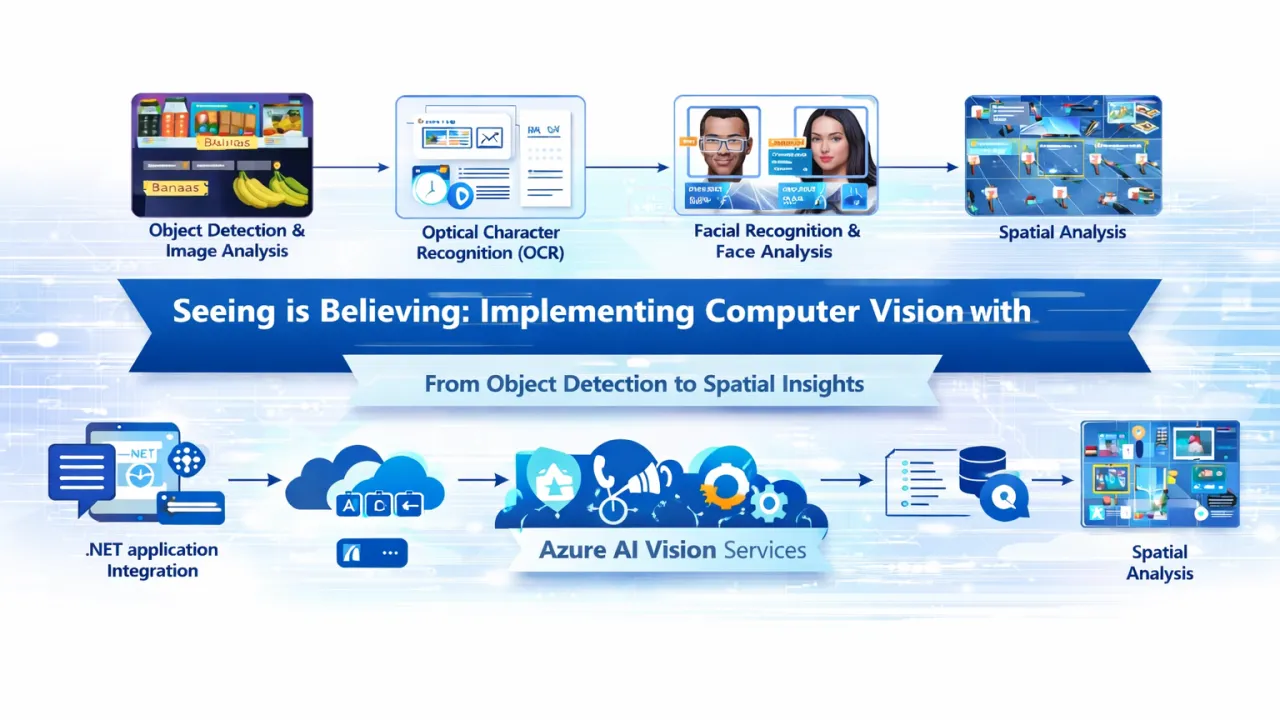
👁️ Object Detection & Image Analysis

What it does

  • Detects common objects (people, vehicles, products, animals)
  • Analyzes scenes, tags, colors, and image content
  • Identifies unsafe or restricted visual content

Real-world use cases

  • Retail apps detecting products on shelves
  • Manufacturing systems identifying defects
  • Smart city solutions monitoring traffic and crowd density

.NET integration example (conceptual)

  • Upload or stream an image from a web or API request
  • Call Azure AI Vision SDK from a .NET service
  • Parse detected objects and confidence scores
  • Store or act on results in business workflows

🧾 Optical Character Recognition (OCR)

What it does

  • Extracts printed and handwritten text from images and PDFs
  • Supports multiple languages and document formats
  • Preserves layout, tables, and line structure

Real-world use cases

  • Invoice and receipt processing
  • ID and document verification
  • Digitizing forms and handwritten notes

Example scenario

A .NET-based finance system automatically extracts invoice numbers, totals, and dates from uploaded scans—eliminating manual data entry and reducing errors.

🙂 Facial Recognition & Face Analysis

What it does

  • Detects faces and facial landmarks
  • Analyzes attributes such as age range, emotion, and presence
  • Supports identity verification (with responsible AI controls)

Real-world use cases

  • Secure access control systems
  • User verification in onboarding flows
  • Personalized digital experiences

⚠️ Important: Facial recognition must be implemented responsibly, following regional compliance and ethical AI guidelines.

📐 Spatial Analysis (Vision at Scale)

What it does

  • Analyzes video streams in real time
  • Tracks movement, presence, and interactions in physical spaces
  • Detects patterns across defined zones

Real-world use cases

  • Retail footfall analytics
  • Workplace safety monitoring
  • Smart building occupancy insights

Example scenario

A .NET-powered dashboard visualizes real-time occupancy trends in a commercial space using spatial analysis data from connected cameras.

🔗 Integrating Azure AI Vision into .NET Applications

A typical architecture looks like this:

  1. .NET application (ASP.NET API, Web App, or Background Service)
  2. Azure AI Vision SDK or REST API call
  3. Secure authentication using Azure identity
  4. Process results (JSON response)
  5. Store insights in databases or trigger business logic

This modular approach allows vision capabilities to be reused across multiple applications and services.

📊 Monitoring, Scaling, and Optimization

Azure AI Vision services are built for enterprise workloads:

  • Automatic scaling with demand
  • Integrated logging and telemetry
  • Performance monitoring through Azure tools
  • Continuous model improvements without code changes

🏁 Final Thoughts

Computer vision is no longer a niche capability—it’s a competitive advantage. With Azure AI Vision services, .NET developers can rapidly build applications that see, understand, and react to visual information in real time.

From document processing and facial analysis to object detection and spatial insights, Azure AI Vision empowers teams to turn images and video into actionable intelligence—securely, responsibly, and at scale.

In modern applications, seeing truly is believing—and with Azure AI and .NET, it’s also achievable.
Crafting Intelligent Chatbots with Azure AI: From Simple Q&A to Conversational Intelligence

Chatbots have evolved far beyond static question-and-answer systems. Today’s users expect natural conversations, contextual understanding, personalization, and intelligent responses—across channels and at scale. Azure AI provides a comprehensive ecosystem to build such sophisticated conversational experiences, from basic FAQs to enterprise-grade virtual assistants.

This guide walks through the end-to-end process of building intelligent chatbots using Azure AI, highlighting how multiple services work together to deliver responsive, human-like interactions.

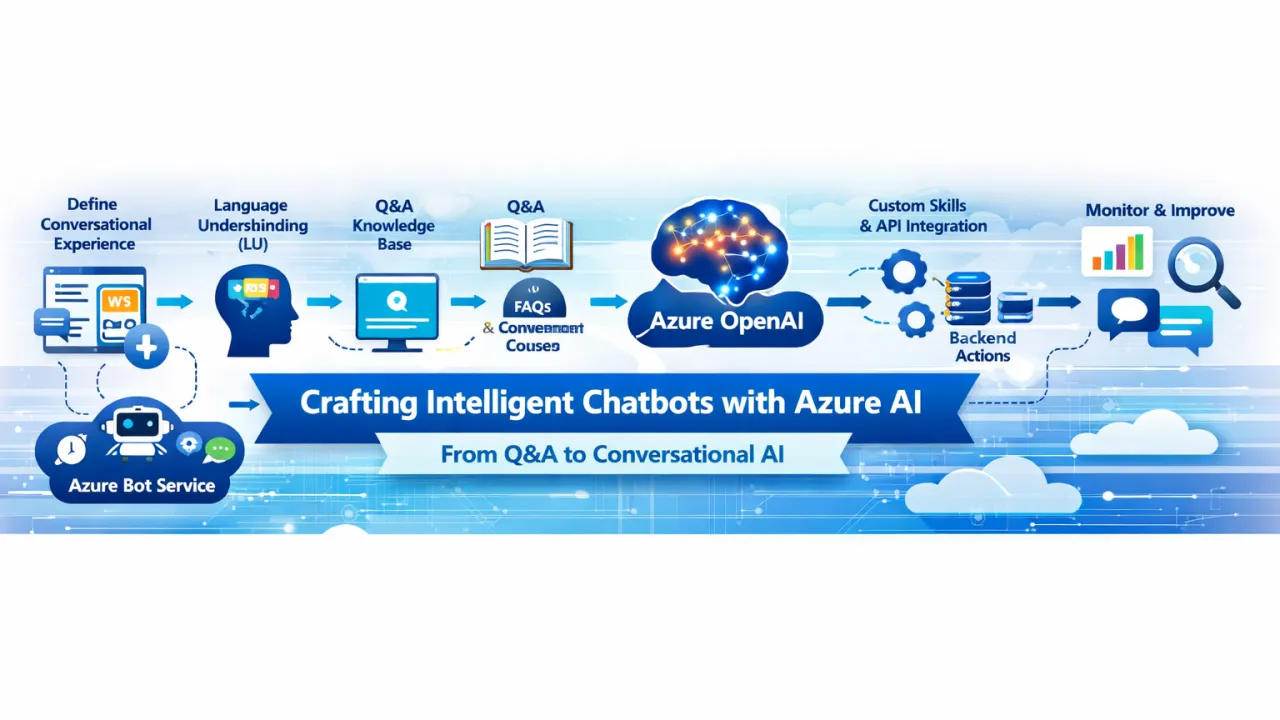
🧠 Step 1: Define the Conversational Experience

Before choosing tools, it’s critical to define:

  • Purpose – Customer support, internal helpdesk, sales assistant, or task automation
  • Channels – Web chat, Microsoft Teams, mobile apps, voice assistants
  • Complexity – FAQ-based, intent-driven, or multi-turn conversational workflows

This clarity ensures the architecture aligns with business and user expectations.

🤖 Step 2: Core Bot Framework with Azure Bot Service

At the heart of the solution is Azure Bot Service, which acts as the orchestration layer for all conversational interactions. It:

  • Manages conversations and sessions
  • Connects to multiple channels
  • Routes user input to the appropriate AI services

The bot itself can be built using familiar languages such as C# or JavaScript and deployed seamlessly to the cloud.

🗣️ Step 3: Natural Language Understanding (NLU)

To move beyond keyword matching, chatbots must understand user intent and context.

Language Understanding (LU)

  • Extracts intents (what the user wants to do)
  • Identifies entities (dates, locations, product names, IDs)
  • Supports multi-turn conversations by tracking context

Example: A user asks, “Can I reschedule my delivery to next Friday?” The bot understands:

  • Intent: Reschedule delivery
  • Entity: Date = next Friday

This enables precise and relevant responses.

📚 Step 4: Knowledge-Based Answers with Q&A Capabilities

For FAQ-style interactions, Azure’s Q&A capabilities allow bots to:

  • Answer questions from structured knowledge bases
  • Pull responses from documents, PDFs, or web content
  • Provide fast, consistent answers without custom logic

This is ideal for:

  • Policy questions
  • Product documentation
  • Internal knowledge portals

🧩 Step 5: Intelligent Conversations with Azure OpenAI

To create truly natural and engaging conversations, Azure OpenAI adds generative intelligence to the chatbot.

Key capabilities:

  • Human-like, free-form responses
  • Context-aware dialogue across multiple turns
  • Summarization, reasoning, and content generation
  • Dynamic handling of unstructured or unexpected queries

This transforms chatbots from scripted responders into adaptive conversational agents.

🔧 Step 6: Extending Capabilities with Custom Skills

Enterprise chatbots often need to take action, not just talk.

Custom skills allow the bot to:

  • Call APIs and backend systems
  • Trigger workflows (orders, tickets, approvals)
  • Integrate with CRM, ERP, or internal tools
  • Execute business logic securely

Example: A chatbot that checks order status, updates customer details, or books appointments in real time.

🔄 Step 7: Context Management & Orchestration

By combining:

  • Azure Bot Service for conversation flow
  • Language Understanding for intent recognition
  • Q&A for factual answers
  • Azure OpenAI for generative dialogue
  • Custom skills for business actions

You can build multi-turn, context-aware conversational experiences that feel seamless and intelligent.

📊 Step 8: Monitoring, Learning, and Continuous Improvement

Production-ready chatbots require ongoing optimization:

  • Conversation analytics and telemetry
  • Intent accuracy monitoring
  • Feedback loops for retraining models
  • Performance and latency tracking

Azure provides built-in monitoring tools to ensure bots improve over time.

🏁 Final Thoughts

Building intelligent chatbots is no longer about choosing a single AI service—it’s about orchestrating multiple AI capabilities into a cohesive conversational system. With Azure AI, teams can evolve from simple Q&A bots to enterprise-grade conversational platforms that understand intent, maintain context, integrate with business systems, and respond naturally.

By leveraging Azure Bot Service, natural language understanding, knowledge-based responses, generative AI, and custom skills—organizations can deliver chatbots that don’t just answer questions, but solve problems and enhance user experiences.

In the era of AI-driven interaction, great chatbots aren’t scripted—they’re intelligent, adaptive, and context-aware.

Unlocking Intelligence: A Developer’s Guide to Azure AI Services

Artificial Intelligence is no longer a futuristic concept—it’s a core capability of modern software. From image recognition and speech processing to conversational interfaces and predictive analytics, AI is transforming how applications interact with users and data.

For developers, especially those building on Microsoft Azure, Azure offers a powerful and accessible ecosystem of AI services. These services allow teams to add intelligence to applications without needing deep data science expertise, while still offering flexibility for advanced machine learning scenarios.

This guide provides a comprehensive overview of Azure AI services—covering Cognitive Services, Azure OpenAI Service, and Azure Machine Learning—and explains how .NET developers can integrate them seamlessly into real-world applications.

The Azure AI Ecosystem at a Glance

Azure AI services can be broadly grouped into three categories:

  1. Prebuilt AI (Cognitive Services) – Ready-to-use APIs for vision, language, speech, and decision-making
  2. Generative AI (Azure OpenAI Service) – Large language models for reasoning, content generation, and conversational AI
  3. Custom AI (Azure Machine Learning) – End-to-end platform for building, training, and deploying ML models

Together, these services cover the full spectrum of AI needs—from simple API calls to advanced model lifecycle management.

Azure Cognitive Services: Prebuilt Intelligence for Everyday Use

Azure Cognitive Services provide pre-trained AI models exposed through simple REST APIs and SDKs. They are ideal for developers who want to add intelligence quickly, without training models from scratch.

Vision Services

Azure Vision services enable applications to understand and analyze visual content. Common capabilities include image classification, object detection, OCR (optical character recognition), and facial analysis.

Use cases:

  • Extracting text from invoices or receipts
  • Detecting objects in images or videos
  • Moderating user-uploaded content

For .NET developers, Vision APIs can be consumed easily using official SDKs, allowing image analysis to be integrated directly into ASP.NET or desktop applications.

Language Services

Azure Language services enable natural language understanding and processing. These include sentiment analysis, key phrase extraction, entity recognition, and conversational language understanding.

Use cases:

  • Analyzing customer feedback and reviews
  • Categorizing support tickets automatically
  • Building chatbots that understand intent

.NET developers can integrate language APIs into web APIs or background services to analyze text in real time or batch workflows.

Speech Services

Azure Speech services convert speech to text, text to speech, and enable speech translation across languages.

Use cases:

  • Voice-enabled applications
  • Real-time transcription for meetings or calls
  • Accessibility features for users with disabilities

Speech services integrate seamlessly into .NET applications, enabling both cloud-based and real-time streaming scenarios.

Azure OpenAI Service: Generative AI at Enterprise Scale

Azure OpenAI Service brings powerful large language models into the Azure ecosystem, offering secure, compliant access to generative AI capabilities.

With Azure OpenAI, developers can build applications that:

  • Generate human-like text
  • Summarize documents
  • Answer complex questions
  • Power intelligent chat and copilots

For .NET developers, Azure OpenAI integrates through REST APIs and SDKs, making it easy to embed generative AI into existing applications. Combined with orchestration tools like Semantic Kernel, these models can reason, plan, and interact with application logic—going far beyond simple chat interfaces.

Use cases include:

  • AI-powered customer support assistants
  • Intelligent search and knowledge retrieval
  • Automated report and content generation

Azure Machine Learning: Custom AI for Advanced Scenarios

While Cognitive Services and Azure OpenAI provide prebuilt intelligence, Azure Machine Learning is designed for teams that need full control over the machine learning lifecycle.

Azure Machine Learning enables developers and data scientists to:

  • Train custom ML models using Python or R
  • Experiment with algorithms and hyperparameters
  • Deploy models as scalable web services
  • Monitor model performance in production

For .NET applications, Azure ML models can be consumed via REST endpoints, allowing C# services and APIs to leverage custom-trained intelligence without embedding ML logic directly in the app.

Use cases:

  • Fraud detection systems
  • Recommendation engines
  • Predictive analytics and forecasting

Integrating Azure AI into .NET Applications

One of Azure’s biggest strengths is how seamlessly AI services integrate into .NET-based systems.

.NET developers can:

  • Call Azure AI services via REST APIs or official SDKs
  • Secure access using Managed Identities and Azure Key Vault
  • Deploy AI-enabled applications using Azure App Service, Functions, or containers
  • Combine AI outputs with business logic, workflows, and data stores

This allows AI to become a natural extension of application architecture, rather than a separate experimental component.

Choosing the Right Azure AI Service

Selecting the right service depends on your goals:

  • Use Cognitive Services when you need fast, reliable AI for common tasks
  • Use Azure OpenAI Service for conversational, generative, and reasoning-based experiences
  • Use Azure Machine Learning when you need custom models tailored to your data

In many real-world applications, these services are combined—for example, using Vision to extract text, OpenAI to summarize it, and Azure ML to predict outcomes.

Best Practices for Developers

When building AI-powered applications on Azure:

  • Start with prebuilt services before building custom models
  • Secure AI endpoints with Azure AD and Managed Identities
  • Monitor usage, performance, and cost
  • Keep humans in the loop for critical decisions
  • Treat prompts, models, and pipelines as versioned assets

Responsible AI design ensures applications remain trustworthy, scalable, and compliant.

Final Thoughts

Azure AI services empower developers to build intelligent, responsive, and future-ready applications without reinventing the wheel.

By combining Cognitive Services, Azure OpenAI Service, and Azure Machine Learning, .NET developers can unlock new levels of automation, personalization, and insight—while staying within a secure, enterprise-grade cloud platform.

AI is no longer reserved for specialists. With Azure, intelligence becomes just another service—ready to be integrated into every application you build.

The Rise of Azure AI Agents: Automating Intelligence in Modern Applications

Artificial Intelligence is rapidly moving beyond simple chatbots and predictive models. Today, the next major shift is the rise of AI agents—intelligent, autonomous components capable of reasoning, planning, and executing tasks across systems.

In the Microsoft Azure ecosystem, AI agents are becoming a powerful way to automate complex workflows, enhance user interactions, and build smarter applications. Powered by services such as Azure OpenAI Service, Semantic Kernel, and LangChain, Azure AI Agents are redefining what modern .NET applications can do.

This article explores what Azure AI Agents are, how they are built, and why they represent the future of intelligent automation.

What Are Azure AI Agents?

An AI agent is more than a language model responding to prompts. It is an intelligent system that can:

  • Understand goals or user intent
  • Reason about steps needed to achieve those goals
  • Interact with external systems, APIs, and data sources
  • Adapt responses based on context and outcomes

In Azure, AI agents are typically built by combining large language models with orchestration frameworks and business logic. These agents can autonomously perform tasks such as processing documents, answering complex queries, coordinating workflows, or assisting users across applications.

Unlike traditional rule-based automation, AI agents can handle ambiguity, make decisions, and operate across multiple steps—bringing human-like reasoning into software systems.

Core Building Blocks of Azure AI Agents

Azure AI Agents are not a single product but an architecture composed of several key components.

Azure OpenAI Service

At the foundation of most Azure AI Agents is Azure OpenAI Service, which provides secure access to powerful language models such as GPT. These models enable natural language understanding, reasoning, summarization, and content generation.

For .NET developers, Azure OpenAI integrates seamlessly with enterprise-grade security, networking, and compliance—making it suitable for production workloads.

Semantic Kernel: Orchestrating Intelligence

Semantic Kernel is Microsoft’s open-source SDK designed to bridge AI models with traditional application code. It allows developers to define skills, plugins, and functions that AI agents can invoke dynamically.

In a .NET application, Semantic Kernel enables:

  • Combining AI reasoning with C# business logic
  • Calling APIs, databases, or microservices based on AI decisions
  • Maintaining memory and context across interactions

Semantic Kernel transforms language models from passive responders into active decision-makers inside applications.

LangChain: Tool-Based Reasoning and Chaining

LangChain is another popular framework for building AI agents, particularly when tool chaining and reasoning workflows are required. It allows agents to decide which tool to use, when to use it, and how to interpret results.

When integrated with Azure OpenAI, LangChain enables:

  • Multi-step reasoning pipelines
  • Agent-driven API execution
  • Context-aware decision making

This is especially useful for applications that require AI to coordinate actions across multiple services.

How Azure AI Agents Work in Practice

An Azure AI Agent typically follows a loop:

  1. Input Understanding – The agent interprets user input or system events
  2. Reasoning & Planning – The model decides what actions are required
  3. Tool Invocation – APIs, databases, or services are called
  4. Result Evaluation – Outputs are analyzed for correctness
  5. Response or Action – The agent responds or proceeds to the next step

This architecture allows agents to operate autonomously while remaining controlled by application logic and security boundaries.

Use Cases for Azure AI Agents in .NET Applications

Azure AI Agents unlock a wide range of real-world scenarios for .NET developers.

In enterprise applications, agents can automate internal workflows such as generating reports, analyzing logs, or summarizing compliance documents. In customer-facing systems, AI agents can power intelligent virtual assistants that go beyond scripted responses—capable of booking services, retrieving account data, or resolving complex support requests.

In developer productivity tools, AI agents can assist with code reviews, documentation generation, or CI/CD troubleshooting. In data-driven applications, agents can analyze large datasets, answer natural-language queries, and generate insights without predefined queries.

These use cases share a common theme: reducing manual effort while increasing intelligence and responsiveness.

Benefits of Azure AI Agents

For development teams, Azure AI Agents offer several strategic advantages.

They enable automation of complex workflows that were previously too dynamic for traditional scripting. They enhance user experience by allowing natural language interaction instead of rigid UI flows. They improve developer productivity by offloading repetitive or analytical tasks to AI-driven components.

Most importantly, because these agents are built on Azure, they inherit enterprise-grade security, scalability, and compliance—making them suitable for regulated industries.

Best Practices for Building Azure AI Agents

To build effective and responsible AI agents, teams should follow a few key principles.

Agents should operate within clear boundaries, with restricted access to APIs and data. Human-in-the-loop mechanisms should be used for high-risk decisions. Prompt design and skill definitions should be version-controlled like application code.

Monitoring and observability are critical—agent actions should be logged, auditable, and measurable. Finally, developers should design agents to assist and augment, not blindly replace, human decision-making.

The Future of Intelligent Applications on Azure

Azure AI Agents represent a shift from static applications to adaptive, intelligent systems. As models improve and orchestration frameworks mature, agents will become capable of handling increasingly complex tasks with minimal supervision.

For .NET developers, this evolution opens the door to a new class of applications—systems that reason, act, and learn in real time. By combining Azure OpenAI, Semantic Kernel, and LangChain, developers can embed intelligence directly into the core of their applications.

Final Thoughts

The rise of Azure AI Agents marks a turning point in application development. Intelligence is no longer an add-on feature—it is becoming a core architectural component.

By leveraging Azure’s AI ecosystem, developers can build applications that don’t just respond to users but actively work on their behalf. In an era where efficiency, personalization, and automation define success, Azure AI Agents provide the foundation for the next generation of intelligent software.