Prilixor

Navigating the Azure Ecosystem: Essential Services Every Developer Should Know

Cloud computing has transformed the way modern applications are designed, built, and deployed. Among the leading platforms, Microsoft Azure stands out for its breadth of services and developer-friendly tools. However, for many developers, Azure’s vast ecosystem can feel overwhelming. Beyond the well-known Virtual Machines and compute options, Azure offers a suite of essential services that every developer should master to build secure, scalable, and future-ready applications.

Let’s explore the most important services developers need to know—and how each plays a crucial role in application development.

1. Azure App Service – Build and Scale Web Applications with Ease

One of Azure’s most developer-friendly offerings is Azure App Service, a fully managed Platform-as-a-Service (PaaS). It abstracts away infrastructure concerns, allowing developers to focus on coding and innovation.

  • Supports multiple frameworks: .NET, Node.js, Java, Python, PHP, and Ruby.
  • Automatic scaling: Applications can handle traffic spikes seamlessly.
  • CI/CD Integration: Direct hooks into GitHub, Azure DevOps, and Bitbucket for streamlined deployments.
  • Built-in security: Integration with Azure Active Directory and OAuth providers like Google, Facebook, and Microsoft.

👉 Use Case Example: A fintech startup can deploy a .NET Core API on Azure App Service with auto-scaling enabled, ensuring high availability during end-of-month financial transactions.

2. Azure SQL Database – Intelligent, Managed Relational Database

Databases are the heart of most applications. With Azure SQL Database, developers get the power of SQL Server in a fully managed, intelligent, and scalable environment.

  • No infrastructure management: Backups, updates, and patching are automatic.
  • High availability: Built-in redundancy across multiple Azure regions.
  • Elastic pools: Share resources across multiple databases cost-effectively.
  • AI-driven optimization: Automatic tuning and performance insights.

👉 Use Case Example: An e-commerce app can store customer profiles, transactions, and product data in Azure SQL Database while benefiting from query performance insights for faster page loads.

3. Azure Storage – A Universal Store for All Data Types

Data comes in many forms, and Azure Storage provides specialized services for each need:

  • Blob Storage: For unstructured data such as images, videos, and backups.
  • File Storage: Fully managed file shares accessible via SMB protocol.
  • Queue Storage: Simple, reliable messaging between app components.
  • Table Storage: A NoSQL key-value store for semi-structured data.

What makes Azure Storage compelling is its durability (99.999999999% data availability), global replication, and seamless integration with other Azure services.

👉 Use Case Example: A social media platform can store user-uploaded photos in Blob Storage, with automatic replication across regions for global availability.

4. Azure Key Vault – Secure Management of Secrets and Certificates

Security is non-negotiable in modern application development. Hardcoding secrets in code repositories is a serious risk, but Azure provides a solution: Azure Key Vault.

  • Store sensitive information: API keys, tokens, passwords, and connection strings.
  • Manage encryption keys: Simplifies compliance with standards like GDPR, PCI-DSS, and HIPAA.
  • Access control: Fine-grained access policies with Azure Active Directory.
  • Developer integration: Works seamlessly with applications via Managed Identities, avoiding direct handling of credentials.

👉 Use Case Example: A healthcare app can securely store database credentials and SSL certificates in Key Vault, ensuring compliance with HIPAA regulations.

5. Azure Monitor – Observability for Cloud Applications

Once an app is deployed, monitoring becomes critical. Azure Monitor, combined with Application Insights, provides a full observability stack.

  • Metrics and logs: Track application performance, request latency, and failures.
  • Alerts: Automated alerts via email, SMS, or integration with Teams/Slack.
  • Dashboards: Visualize app health, traffic trends, and dependencies.
  • Distributed tracing: Troubleshoot bottlenecks in microservices-based apps.

👉 Use Case Example: A SaaS company hosting a multi-tenant app can use Azure Monitor to track per-tenant performance, optimize queries, and detect anomalies before customers are impacted.

Why These Services Matter for Developers

  • Productivity: Developers spend less time managing infrastructure and more time coding.
  • Scalability: Azure’s services are designed to grow with your business.
  • Security: Built-in compliance and data protection features minimize risks.
  • Integration: Each service works seamlessly with others, enabling smooth end-to-end workflows.

Final Thoughts

The Azure ecosystem is vast, but developers don’t need to master everything at once. By focusing on App Service, SQL Database, Storage, Key Vault, and Monitor, you cover the backbone of most modern applications. These services empower developers to build applications that are scalable, reliable, and secure, while freeing them from the complexities of infrastructure management.

Mastering these essentials not only makes development smoother but also positions you as a forward-thinking professional ready for the future of cloud-first development.

🔑 Takeaway: Azure isn’t just a platform—it’s an ecosystem. Learn its core services, and you’ll unlock endless opportunities in the cloud world.
Monitoring Your Azure Deployments: Key Metrics and Tools for Health & Performance

Cloud adoption has transformed how applications are deployed and scaled, but it has also introduced new complexities. In Microsoft Azure, applications are often distributed across multiple services — from Azure App Service and Virtual Machines to Kubernetes clusters and serverless functions. With this complexity, monitoring becomes the backbone of reliability, ensuring that deployments remain healthy, performant, and cost-efficient.

Monitoring is no longer just about checking uptime; it’s about tracking key metrics, identifying anomalies in real time, and proactively addressing issues before they impact end users. Azure provides a rich ecosystem of tools and services that empower developers, DevOps teams, and businesses to achieve just that.

Key Metrics to Track in Azure Deployments

Monitoring is most effective when you know what to measure. Some of the critical categories include:

  1. Availability Metrics
  2. Performance Metrics
  3. Resource Utilization Metrics
  4. Application-Specific Metrics

Tracking these metrics consistently provides visibility into system health and user experience, while also optimizing cloud spending by avoiding over- or under-provisioned resources.

Core Azure Monitoring Tools

Azure provides a tightly integrated toolset for monitoring every layer of your deployment, from infrastructure to application code.

1. Azure Monitor

Azure Monitor acts as the central hub for observability in Azure. It collects data from VMs, containers, databases, and PaaS resources, consolidating it into dashboards and logs. Its key strengths are:

  • Unified metrics and log collection across the Azure ecosystem.
  • Integration with alerting systems for proactive notifications.
  • Custom dashboards to visualize KPIs at infrastructure or application level.

2. Application Insights

For developers, Application Insights is the most powerful tool. It provides application performance monitoring (APM), with insights such as:

  • Request response times, dependency tracking, and error diagnostics.
  • End-to-end transaction tracing, even across microservices.
  • Real-time user telemetry, such as session duration and geographic traffic.
  • Integration with .NET, Java, Node.js, and Python applications.

This enables teams to catch performance degradations, API slowdowns, and unhandled exceptions quickly.

3. Log Analytics

Log Analytics is the query engine behind Azure Monitor. It allows teams to dig deep into telemetry data with Kusto Query Language (KQL). Examples include:

  • Analyzing patterns in failed logins for security monitoring.
  • Detecting anomalies in request rates.
  • Correlating application logs with infrastructure failures.

4. Alerts and Dashboards

To make monitoring actionable, Azure enables:

  • Automated alerts that trigger based on thresholds (e.g., CPU > 80%, error rate > 5%).
  • Smart alerts powered by machine learning to detect unusual patterns.
  • Custom dashboards for NOC (Network Operations Center) or DevOps teams.

This ensures that issues are identified before customers notice them, reducing downtime and improving SLA adherence.

Best Practices for Developers and Teams

Monitoring tools are only effective if paired with best practices:

  • Define SLIs, SLOs, and SLAs: Service Level Indicators (SLIs) and Objectives (SLOs) guide what metrics matter most. For example, “99.9% uptime” may translate into strict error-rate and latency monitoring.
  • Integrate monitoring with CI/CD pipelines: Ensuring every new deployment is validated with synthetic tests and telemetry integration.
  • Tag and organize resources: Proper resource tagging improves observability across environments (dev, test, production).
  • Enable distributed tracing: Especially critical in microservices and serverless architectures.
  • Set proactive alerts: Don’t wait for customer complaints — configure alerts for unusual traffic spikes, error surges, or resource drains.

When Things Go Wrong: Root Cause Analysis

No deployment is perfect, and failures are inevitable. Monitoring helps reduce MTTR (Mean Time to Recovery) by:

  • Correlating application failures with infrastructure events.
  • Identifying whether an issue stems from code changes, external dependencies, or resource exhaustion.
  • Providing developers with full visibility into the chain of events leading to downtime.

This accelerates incident resolution and fosters a culture of continuous improvement.

Conclusion

In today’s cloud-driven ecosystem, monitoring is more than an operational requirement; it is a strategic advantage. With Azure Monitor, Application Insights, and Log Analytics, organizations gain comprehensive visibility into system health, performance, and user experience.

By tracking the right metrics, adopting best practices, and integrating monitoring into the DevOps lifecycle, teams can transform their Azure deployments from reactive to proactive — delivering reliable, scalable, and high-performing applications that meet user expectations and business goals.

Containerizing .NET Apps for Azure: Docker to Azure Container Apps/AKS

The way applications are built and deployed has changed dramatically in the last decade. For .NET developers, containerization has become one of the most powerful approaches to building modern, cloud-ready applications. By packaging an application and its dependencies into a single lightweight unit, containers provide a level of portability, consistency, and scalability that traditional deployment models cannot match.

Why Containerization Matters for .NET Developers

Traditionally, .NET applications were tied to Windows environments, which often led to challenges in deployment and scaling. With the evolution of .NET Core and now .NET 6/7/8, the framework became truly cross-platform, enabling developers to run applications inside Docker containers on Windows, Linux, or macOS.

This shift allows teams to:

  • Run anywhere: Whether on a local developer machine, staging environment, or production in the cloud, the application behaves the same way.
  • Scale effortlessly: Containers are lightweight, start quickly, and can scale horizontally to meet demand.
  • Ensure consistency: Dependencies, frameworks, and runtime are bundled inside the container, reducing “works on my machine” problems.
  • Align with DevOps: Containerization integrates naturally with CI/CD pipelines, enabling automated testing, building, and deployment.

Azure’s Container Ecosystem

Microsoft Azure provides a rich set of container services tailored to different workloads. Two of the most popular options for .NET developers are Azure Container Apps and Azure Kubernetes Service (AKS).

  • Azure Container Apps: Designed for simplicity and flexibility, it’s ideal for developers who want to focus on code rather than infrastructure. It supports autoscaling, event-driven architectures, and microservices without requiring deep Kubernetes expertise.
  • Azure Kubernetes Service (AKS): A fully managed Kubernetes offering that provides advanced orchestration for complex, large-scale workloads. It’s best suited for organizations running multiple microservices, needing granular networking, or requiring enterprise-grade control and resilience.

Both services integrate seamlessly with Azure Container Registry (ACR), which acts as a secure storage for container images.

Containerization Benefits in Practice

For .NET applications, containerization delivers tangible advantages across the software lifecycle:

  1. Portability – A containerized .NET app can move effortlessly between on-premises servers, developer laptops, and Azure cloud services without reconfiguration.
  2. Performance and Efficiency – Containers share the host OS kernel, making them more resource-efficient compared to traditional virtual machines.
  3. Faster Deployments – Deployments become faster and more reliable since containers are immutable units. Rollbacks and blue-green deployments are easier to implement.
  4. Microservices Ready – Containers are the foundation for building microservices-based architectures, where each service can scale independently.
  5. Integration with Azure Services – Containerized .NET apps can easily consume services like Azure SQL Database, Cosmos DB, Key Vault, and Application Insights.

Choosing Between Container Apps and AKS

  • If your team values developer productivity, faster go-to-market, and serverless scaling, Azure Container Apps is often the best choice. It abstracts away infrastructure while giving you powerful scaling options.
  • If your application landscape is large, complex, and requires advanced orchestration or multi-container deployments, AKS is more suitable. It offers full Kubernetes capabilities while offloading cluster management to Azure.

The Developer Advantage

For .NET teams, embracing containerization is not just a technical upgrade but a cultural shift. It enables developers to:

  • Work in consistent environments regardless of operating system.
  • Collaborate more effectively across development, testing, and operations.
  • Leverage modern DevOps practices such as continuous integration and continuous delivery.
  • Future-proof applications to run seamlessly in any cloud-native ecosystem.

Final Thoughts

Containerization has transformed how .NET applications are developed and deployed. By leveraging Docker along with Azure Container Apps or AKS, developers can ensure their applications are scalable, portable, and cloud-ready.

The choice between Container Apps and AKS depends on the level of complexity and control needed — but in both cases, containerization empowers .NET developers to build modern applications that thrive in today’s fast-moving digital landscape.

Azure DevOps for .NET Teams: Accelerating Your Development Lifecycle

Modern software delivery is no longer just about writing clean code — it’s about how fast you can plan, build, test, and release while maintaining reliability. For .NET teams, Azure DevOps provides an integrated platform that brings planning, coding, testing, and deployment together in one ecosystem, tightly integrated with Visual Studio, C#, and Azure services.

In this article, we’ll break down each part of the .NET application lifecycle and explore how Azure DevOps helps accelerate delivery.

1. Planning & Work Management with Azure Boards

Every .NET project begins with requirements and backlog organization. Azure Boards gives teams visibility and control with tools like:

  • Epics, Features, and User Stories → Define business needs in layers that developers can consume.
  • Agile methodologies support → Scrum, Kanban, or hybrid boards to match team workflows.
  • Backlog Prioritization → Teams can drag and drop tasks, prioritize bug fixes, and ensure dependencies are addressed before sprint planning.
  • Dashboards & Analytics → Burndown charts, velocity tracking, and team capacity planning ensure transparency.

💡 Example: A .NET Core eCommerce team could track new checkout features as Epics, link them to user stories (e.g., “As a customer, I want to pay with PayPal”), and assign developer tasks such as implementing the API integration.

👉 Developer Advantage: Developers see exactly what’s needed, aligned to business value, reducing wasted effort.

2. Source Control & Collaboration with Azure Repos

Version control is the foundation of modern DevOps. With Azure Repos, .NET teams get:

  • Unlimited private Git repos (or TFVC for legacy).
  • Branching strategies → Support for GitFlow, trunk-based, or feature branching.
  • Pull Requests with Policies → Enforce minimum reviewers, build validations, and linked work items before merging.
  • Code Search → Find methods, classes, or NuGet references across large codebases.
  • Integration with IDEs → Visual Studio and VS Code provide native Git support with direct Azure Repos connectivity.

💡 Example: A financial services team developing an ASP.NET Core API can enforce PR policies so that each commit triggers a build and unit test suite before merging to main.

👉 Developer Advantage: Cleaner code, fewer conflicts, and confidence that all merges are production-ready.

3. Continuous Integration (CI) with Azure Pipelines

Automated builds are crucial for speeding up development cycles. Azure Pipelines provides:

  • Build Automation: Compile .NET projects, restore NuGet dependencies, and run unit tests automatically.
  • Cross-Platform Builds: Target Windows, Linux, macOS, and even containers with .NET 6/7/8.
  • Pipeline as Code (YAML): Store CI/CD definitions in Git for versioning and reusability.
  • Parallel Jobs: Run multiple builds/tests simultaneously to cut feedback time.
  • Integration with GitHub and Repos: Every commit or PR can trigger builds instantly.

💡 Example: A .NET Blazor project commits to feature/login-ui → triggers pipeline → builds app → runs Selenium tests → publishes build artifact.

👉 Developer Advantage: Immediate feedback when something breaks, reducing “integration hell.”

4. Continuous Delivery (CD) & Deployment Automation

Beyond CI, delivery pipelines ensure smooth, repeatable releases. With Azure Pipelines CD:

  • Multi-Stage Pipelines → Define environments (Dev → QA → UAT → Prod).
  • Approvals & Gates → Manual approvals or automated checks before promoting a release.
  • Environment Templates → Reuse deployment patterns across teams.
  • Integration with Azure Services: Deploy directly to Azure App Service, AKS, VMs, or Functions.
  • Infrastructure as Code (IaC): Provision environments with Bicep, ARM, or Terraform before deploying code.

💡 Example: A .NET API deployment pipeline → builds Docker image → pushes to Azure Container Registry → deploys to AKS cluster → runs smoke tests → waits for QA approval → rolls out to production.

👉 Developer Advantage: No more manual FTP uploads or deployment errors — everything is automated, consistent, and traceable.

5. Quality Assurance with Azure Test Plans

Testing is baked into Azure DevOps rather than treated as an afterthought. Azure Test Plans provide:

  • Manual Testing: Create step-by-step test cases and capture results.
  • Exploratory Testing: Test new features without scripts, logging bugs as you go.
  • Automated Test Integration: Run MSTest, NUnit, or xUnit inside CI/CD pipelines.
  • Defect Tracking: Bugs automatically link to Boards and commits for traceability.

💡 Example: When a .NET team adds a new checkout flow, QA creates exploratory test sessions in Test Plans, logging defects that developers see directly in Boards.

👉 Developer Advantage: Faster bug discovery and immediate feedback inside the same DevOps environment.

6. Package Management with Azure Artifacts

Modern .NET apps rely on reusable packages. Azure Artifacts helps by:

  • Hosting private NuGet feeds → Share common .NET libraries (e.g., logging, authentication modules).
  • Upstream Sources → Cache public packages from NuGet.org to reduce external dependency risks.
  • Versioning Control → Ensure apps use approved package versions only.

💡 Example: A microservices-based .NET project shares a reusable authentication package internally through Artifacts, preventing duplication and ensuring consistency.

👉 Developer Advantage: Dependency management is simplified, secure, and centralized.

7. Observability & Feedback Loops

Azure DevOps doesn’t stop at deployment. With integrations to Azure Monitor and Application Insights, .NET teams can:

  • Track performance metrics (response times, failure rates).
  • Monitor deployments for rollbacks.
  • Collect user feedback directly in Boards.

💡 Example: After deploying a new API version, telemetry shows a 20% increase in response time → rollback initiated → defect logged in Boards.

👉 Developer Advantage: Problems are caught early in production, before customers notice.

8. Best Practices for .NET Teams Adopting Azure DevOps

  • Adopt Git branching strategy → Choose GitFlow or trunk-based depending on release cadence.
  • Shift-left testing → Run unit and integration tests inside CI pipelines.
  • Automate deployments → Avoid manual releases — pipelines should handle Dev → Prod.
  • Leverage IaC → Use Bicep/Terraform to provision infrastructure alongside app code.
  • Use dashboards → Give visibility to product owners and stakeholders.
  • Integrate security checks → Add SAST/DAST scans in pipelines for DevSecOps readiness.

Conclusion

For .NET teams, Azure DevOps is not just a toolset — it’s a complete ecosystem that connects planning, coding, testing, and releasing into one streamlined workflow. By embracing Boards, Repos, Pipelines, Test Plans, and Artifacts, teams can:

✅ Deliver features faster ✅ Improve collaboration between devs, testers, and ops ✅ Reduce errors through automation ✅ Gain visibility across the entire lifecycle

In today’s competitive landscape, where speed and quality are non-negotiable, Azure DevOps ensures that .NET developers can move from idea to production with confidence.

Infrastructure as Code on Azure: Bicep vs. Terraform – A Developer’s Perspective

🔹 Introduction

As cloud adoption accelerates, Infrastructure as Code (IaC) has become the backbone of scalable, repeatable, and secure cloud operations. Instead of manually configuring infrastructure, developers now define it in code, ensuring consistency across environments.

When it comes to Microsoft Azure, two tools dominate the IaC conversation: Bicep and Terraform. Both serve the same purpose—automating infrastructure provisioning—but differ in syntax, ecosystem, and long-term adoption strategies.

So, which one should developers choose? Let’s break it down.

🔹 What is Azure Bicep?

Bicep is Microsoft’s domain-specific language (DSL) for deploying Azure resources. It acts as a simplified abstraction over ARM (Azure Resource Manager) templates, making deployments easier to write, read, and maintain.

Key Features of Bicep:

  • Native to Azure, tightly integrated with ARM
  • Cleaner syntax compared to JSON ARM templates
  • Automatic type validation for Azure resources
  • First-class support in Azure CLI & Azure PowerShell
  • No need for a state file (Azure handles state internally)

📌 Best for: Azure-focused teams who want simplicity, native integration, and minimal overhead.

🔹 What is Terraform?

Terraform, by HashiCorp, is a multi-cloud IaC tool that allows you to define infrastructure across providers (Azure, AWS, GCP, etc.) using its declarative HCL (HashiCorp Configuration Language).

Key Features of Terraform:

  • Multi-cloud and hybrid cloud support
  • Large community with thousands of reusable modules
  • Strong ecosystem with plugins (providers)
  • Requires managing a state file for tracking resources
  • Mature tool with wide enterprise adoption

📌 Best for: Organizations managing multi-cloud strategies or teams that want a standard IaC tool across environments.

🔹 Head-to-Head Comparison: Bicep vs. Terraform

FeatureBicepTerraformCloud SupportAzure-onlyMulti-cloudLearning CurveEasier for Azure devsSteeper, requires HCLEcosystemLimited (Azure-focused)Vast (multi-cloud modules)State ManagementManaged by AzureRequires external state mgmt (Azure Storage, Terraform Cloud, etc.)IntegrationNative Azure CLI/PowerShell supportWorks across multiple providersCommunityGrowing (Microsoft-backed)Mature, global adoption

🔹 When to Choose Bicep

✅ Your infrastructure is 100% Azure ✅ You want native Azure support with minimal setup ✅ Your team prefers a shorter learning curve ✅ You don’t want to manage state files

🔹 When to Choose Terraform

✅ You operate in a multi-cloud or hybrid environment ✅ Your organization already uses Terraform in other projects ✅ You want access to reusable community modules ✅ You need fine-grained control over state and deployments

🔹 Real-World Example

Imagine deploying a scalable web application:

  • With Bicep, you’d define Azure App Service, Azure SQL Database, and Azure Key Vault in a clean, Azure-native syntax.
  • With Terraform, you could define the same resources plus integrate AWS CloudFront or GCP Storage, all within the same IaC workflow.

🔹 Conclusion

Both Bicep and Terraform are powerful tools, but your choice depends on scope and strategy:

  • Bicep is the go-to for Azure-native teams seeking simplicity and direct integration.
  • Terraform shines when flexibility, multi-cloud adoption, and community-driven modules matter.

🚀 Ultimately, the right tool is the one that aligns with your cloud vision, team skills, and long-term infrastructure roadmap.

Mastering Azure Deployments: Strategies for Seamless CI/CD

In today’s software world, releasing code quickly is no longer enough. What truly matters is how reliably, securely, and repeatably you can move software from development to production.

As applications grow in complexity—with multiple environments, APIs, microservices, and third-party integrations—manual deployment processes become a bottleneck. They increase the risk of downtime, misconfigurations, and inconsistent environments.

This is why Continuous Integration and Continuous Deployment (CI/CD) on Azure is now the backbone of modern application delivery. A well-architected Azure CI/CD pipeline does far more than just “push code”: it creates a resilient, automated, and observable delivery process that supports both technical scalability and business agility.

🚀 Core Strategies for Azure CI/CD Pipelines

1. Multi-Stage Pipelines (Dev → Test → Prod)

The first principle of modern deployments is structured promotion across environments. Instead of pushing code directly into production, pipelines should flow through:

  • Development – where code is built and validated.
  • Testing / QA – where integration, regression, and performance testing happen.
  • Production – where only stable, approved builds are deployed.

Each stage should include gates (like automated tests, manual approvals, or compliance checks) to ensure quality. 👉 This prevents untested code from ever reaching end-users and gives teams confidence in every release.

2. Automated Rollbacks with Deployment Slots

Even with the best testing, failures can and do occur. Instead of scrambling with hotfixes, Azure’s deployment slots allow for blue-green deployments or canary releases.

  • Deploy the new version into a staging slot.
  • Run health checks and smoke tests before swapping.
  • If issues are detected post-swap, rollback instantly to the stable version.

👉 This means downtime is minimized, and end-users are rarely exposed to critical errors.

3. Environment Variables & Feature Flags

One of the most common mistakes in deployments is hardcoding environment-specific values. Azure offers tools like App Configuration and Key Vault to securely manage settings across environments.

  • A single codebase can adapt to Dev, Test, and Prod using environment variables.
  • Feature flags allow teams to control functionality dynamically:

👉 This approach makes deployments safer, more flexible, and faster to recover from mistakes.

4. Testing Gates: Building Quality In

Modern CI/CD pipelines are not just about speed—they’re about building quality assurance into every step. Before any code is promoted, it should pass through automated testing gates:

  • Unit Tests – Validate individual functions and methods.
  • Integration Tests – Ensure services, APIs, and databases communicate correctly.
  • Security Scans – Identify vulnerabilities early (e.g., dependency scanning, OWASP checks).
  • Performance Tests (optional) – Catch scaling issues before production traffic hits.

👉 These gates act as a safety net, reducing the chances of defects slipping into production.

5. Monitoring Hooks & Observability

Deployment doesn’t end when code goes live—it continues with monitoring and feedback loops.

Integrating Azure Monitor and Application Insights into the pipeline gives teams real-time visibility into:

  • Deployment success/failure rates
  • Application health metrics (response times, error rates)
  • User impact during or after deployments

Advanced setups can even halt rollouts automatically if metrics degrade, preventing widespread outages.

👉 This transforms deployments from risky “big bang” events into predictable, observable processes.

🏁 Why CI/CD is the Foundation of Modern Software Delivery

Without CI/CD:

  • Releases are manual, inconsistent, and risky.
  • Teams face downtime, missed deadlines, and higher operational costs.
  • Business agility is lost because software updates take too long.

With CI/CD:

  • Releases are fast, repeatable, and safe.
  • Failures are handled gracefully through automation and rollback.
  • Teams can focus on building features instead of firefighting deployments.
  • Businesses achieve faster time-to-market while maintaining quality.

In short: CI/CD pipelines are not just a DevOps practice—they are a business enabler.

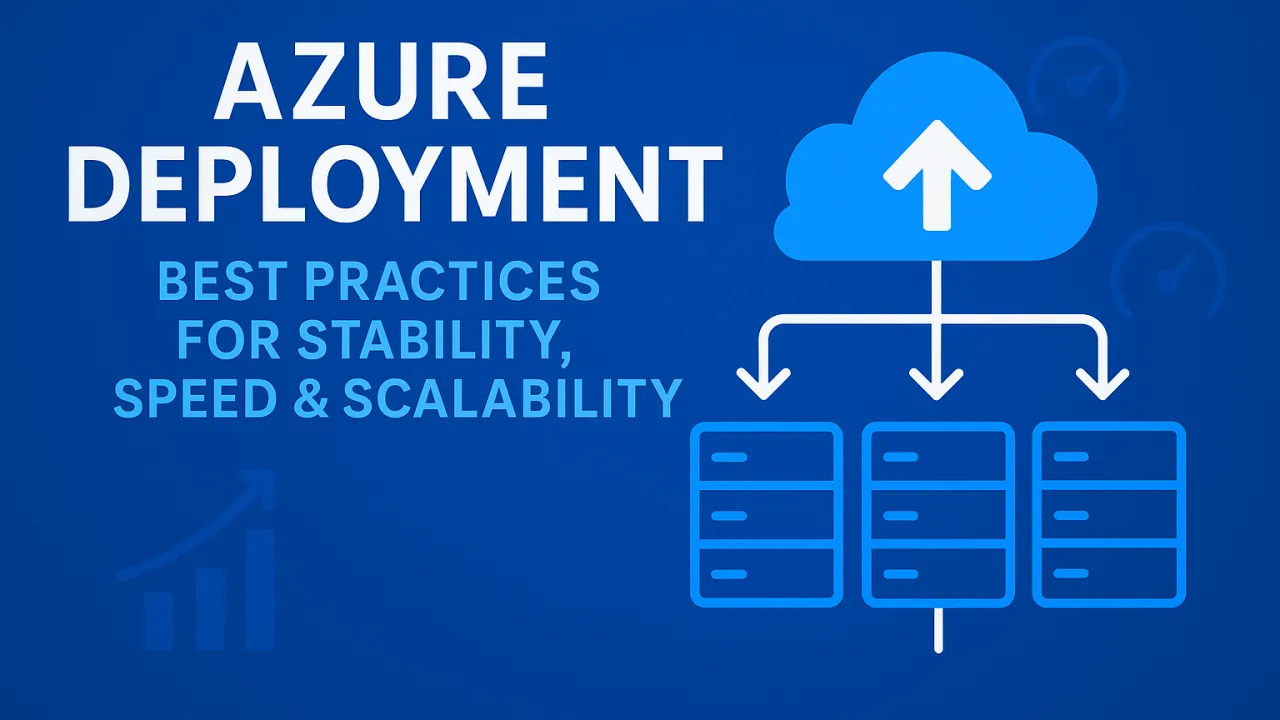
Azure Deployment: Best Practices for Stability, Speed & Scalability

In today’s digital-first world, deploying applications on Microsoft Azure is more than just “pushing code to the cloud.” Successful deployment requires a strategic balance of stability, speed, and scalability. Whether you’re building a small web app or running a global enterprise workload, following proven deployment best practices ensures higher availability, faster performance, and smoother user experiences.

1. Stability – Ensuring Reliability in Every Deployment

A stable deployment means that your application performs consistently without downtime or unexpected issues. On Azure, stability can be achieved through:

a) Infrastructure as Code (IaC)

  • Use Azure Resource Manager (ARM) templates, Bicep, or Terraform to define infrastructure consistently.
  • Automating infrastructure ensures repeatable deployments and reduces human error.

b) Blue-Green & Canary Deployments

  • Blue-Green: Run two environments in parallel (Blue = current, Green = new). Switch traffic only after testing Green.
  • Canary: Release updates gradually to a small portion of users before rolling out globally.

c) Monitoring & Logging

  • Use Azure Monitor, Application Insights, and Log Analytics for real-time visibility.
  • Implement alerts for error rates, latency, and unusual traffic patterns.

d) Disaster Recovery (DR) & Backups

  • Leverage Azure Site Recovery and Geo-redundant storage (GRS).
  • Regular snapshots and automated backup policies protect from unexpected failures.

2. Speed – Faster Deployments, Faster Releases

Speed is not just about deployment time—it’s about how quickly you can ship reliable features without downtime.

a) CI/CD Pipelines

  • Implement Azure DevOps Pipelines or GitHub Actions for continuous integration and delivery.
  • Automate builds, tests, and deployments for faster cycles.

b) Containerization & Serverless

  • Use Azure Kubernetes Service (AKS) for containerized workloads.
  • Deploy serverless functions with Azure Functions to reduce overhead and speed up scaling.

c) Parallel Deployments

  • Deploy multiple services independently using microservices architecture.
  • Avoid bottlenecks by isolating deployment lifecycles of critical services.

d) Testing in Pre-production Environments

  • Use staging slots in Azure App Service for testing before swapping into production.
  • Validate speed and performance before end-users are impacted.

3. Scalability – Growing Without Limits

Azure’s global cloud infrastructure enables scaling applications from 10 users to millions. To achieve seamless scalability:

a) Auto-Scaling

  • Configure Azure Autoscale rules based on CPU, memory, or custom metrics.
  • Scale up (increase resources per instance) or out (add more instances).

b) Load Balancing

  • Use Azure Load Balancer or Application Gateway to distribute traffic.
  • Implement Traffic Manager for geo-distribution, directing users to the closest Azure region.

c) Database Scaling

  • Opt for Azure SQL Database Elastic Pools or Cosmos DB for high-scale scenarios.
  • Use read replicas and caching for faster data access.

d) Event-Driven Architectures

  • Integrate Azure Event Grid, Service Bus, and Event Hubs for scalable communication.
  • Asynchronous processing reduces bottlenecks and supports higher workloads.

4. Security – The Backbone of Stability & Scalability

Without security, deployment practices are incomplete. Azure provides multiple security tools:

  • Azure Key Vault: Securely store secrets, API keys, and certificates.
  • Managed Identities: Reduce password-based authentication risks.
  • Zero Trust Principles: Enforce least-privilege access with Azure Active Directory (AD) and conditional access.
  • DDoS Protection: Protect apps from unexpected traffic surges.

5. Cost Optimization – Speed & Scale Without Wasting Resources

Scaling fast without controlling costs can hurt long-term efficiency. Best practices include:

  • Use Azure Advisor to get recommendations on underutilized resources.
  • Apply Reserved Instances and Spot VMs for predictable workloads.
  • Leverage serverless consumption plans for event-driven apps to pay only for usage.

Final Thoughts

Deploying on Azure is not just about launching apps—it’s about building resilient, high-performing, and scalable solutions that can adapt to user demands in real-time.

By following IaC, CI/CD pipelines, auto-scaling, global traffic management, and security best practices, organizations can unlock the true power of Azure.

In the long run, a well-structured Azure deployment strategy ensures: ✅ Stability – No downtime, smooth rollbacks, and disaster recovery. ✅ Speed – Faster release cycles and reduced deployment friction. ✅ Scalability – Seamless growth from startup to enterprise scale.

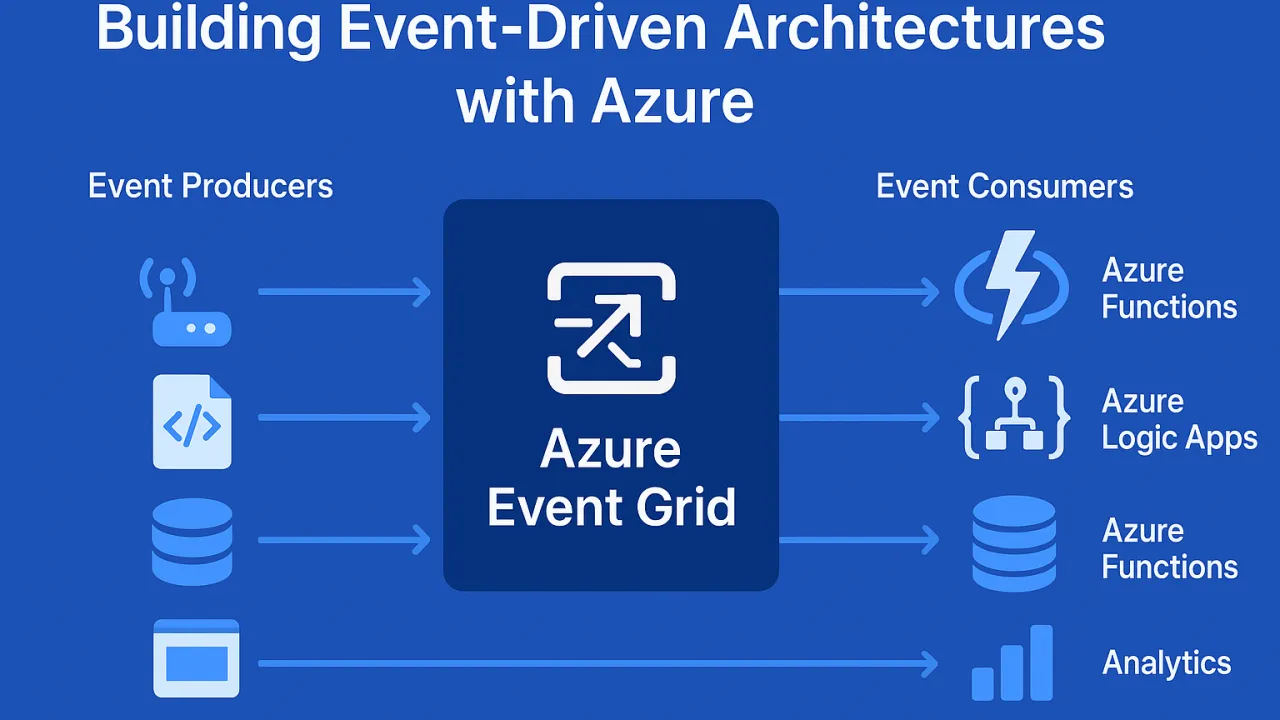
Building Event-Driven Architectures with Azure

Modern applications demand real-time responsiveness, scalability, and resilience. Traditional request-response models often struggle under unpredictable workloads. That’s where event-driven architecture (EDA) shines — enabling systems to react instantly to business events.

Azure provides a powerful ecosystem for building and managing event-driven solutions that scale seamlessly with demand.

🔹 What is Event-Driven Architecture (EDA)?

EDA is a design pattern where applications produce and consume events asynchronously. Instead of tightly coupling services, events act as a communication bridge across systems.

  • Producers (emitters): Applications, IoT devices, APIs that generate events.
  • Consumers (subscribers): Services that listen and respond to these events.
  • Event brokers/routers: Middleware that delivers events reliably (Azure Event Grid, Service Bus, etc.).

🔹 Benefits of Event-Driven Systems with Azure

  1. Scalability – Applications scale on demand when events occur.
  2. Resilience – Services remain loosely coupled; failure in one doesn’t bring down the system.
  3. Real-Time Insights – Process data streams instantly (IoT, logs, financial transactions).
  4. Cost-Efficiency – Pay only for execution when events are triggered (serverless).
  5. Flexibility – Supports multiple event sources: apps, Azure resources, SaaS apps, custom systems.

🔹 Azure Services for Event-Driven Architectures

  1. Azure Event Grid – Central event routing service with low latency and massive throughput.
  2. Azure Service Bus – Enterprise messaging for complex workflows with ordered delivery.
  3. Azure Event Hubs – High-volume event ingestion (IoT, telemetry, streaming).
  4. Azure Functions – Serverless compute that reacts to events instantly.
  5. Azure Logic Apps – Low-code workflows triggered by events.

🔹 Real-World Use Cases

  • IoT Applications: Devices sending telemetry → Azure Event Hub → Real-time analytics.
  • E-commerce: Order placed → Event Grid notifies → Inventory update, payment, shipping workflows.
  • Financial Services: Fraud detection triggered by unusual transaction events.
  • DevOps: Event-driven CI/CD pipelines based on repo changes.

🔹 Best Practices for Azure Event-Driven Systems

  • Use dead-letter queues to handle failed event deliveries.
  • Optimize event schema to ensure lightweight payloads.
  • Employ event versioning to avoid breaking consumers.
  • Choose the right broker (Event Grid vs Service Bus vs Event Hub) based on scenario.
  • Secure events with Azure AD authentication and role-based access control.

🔹 Conclusion

Event-driven architectures unlock real-time, scalable, and fault-tolerant applications. With Azure’s ecosystem — Event Grid, Event Hubs, Service Bus, and Functions — developers can build responsive systems that handle millions of events seamlessly.

The future of cloud-native applications is event-driven — and Azure makes it possible at scale.

Cold Starts in Azure Functions: Strategies for Lightning-Fast Responsiveness

Serverless computing with Azure Functions brings elasticity, scalability, and cost-effectiveness. But there’s a hidden challenge many teams run into: cold starts.

Whenever a new instance of your function spins up (for example, when load spikes or after a period of inactivity), Azure needs to allocate resources, load assemblies, initialize dependencies, and prepare runtime execution. This startup delay can range from a few hundred milliseconds to 2–5 seconds — unacceptable for latency-sensitive APIs, financial transactions, or real-time applications.

The larger your application, the heavier your dependencies, the longer these cold starts can become.

🔍 Why Cold Starts Happen

  1. Resource Allocation: Under the Consumption Plan, resources are created dynamically only when needed.
  2. Runtime Initialization: The .NET runtime or Node.js environment loads, which consumes time.
  3. Dependency Loading: Large DI containers or unoptimized libraries increase boot overhead.
  4. Idle Timeout: After inactivity (usually 20 minutes), instances are unloaded, forcing a fresh start.

🔧 Strategies for Minimizing Cold Start Latency

1. Use Premium (Elastic) Plan

  • Pre-warmed instances are kept ready, ensuring incoming requests do not suffer the penalty of resource allocation.
  • Ideal for mission-critical apps that demand high responsiveness.

2. Optimize Dependency Injection

  • Heavy DI frameworks increase startup time.
  • Use lightweight containers or trim down unnecessary assemblies.
  • Modularize services—load only what’s needed during boot.

3. Lazy Initialization

  • Not every component needs to load upfront.
  • Defer non-essential services like logging, analytics, or third-party API connectors until after the first request is served.
  • This reduces cold start latency and smoothens initial responsiveness.

4. Enable Always On (App Service Plan)

  • Keeps functions continuously active, eliminating idle shutdowns.
  • While it increases cost, it’s efficient for moderate-usage APIs where cold starts directly impact UX.

5. Regional Deployment Strategy

  • Choose Azure regions geographically closest to your user base.
  • Even if you optimize cold start times, network round-trip latency can degrade performance if regions are poorly selected.

📊 Example Impact of Cold Starts

  • An API serving 1 million users/month with an average cold start delay of 2 seconds could cause:

💡 Key Takeaway

Cold starts may appear minor on paper, but at scale, milliseconds turn into minutes, and minutes into hours. By combining smart architectural choices (Premium Plan, lightweight DI, lazy loading) with strategic deployment (Always On, regional proximity), you can ensure your Azure Functions remain lightning-fast, reliable, and production-ready.

Securing Your Azure Functions: Best Practices for Serverless Security

The shift towards serverless computing has transformed the way organizations build and deploy applications. Azure Functions offer developers the ability to scale on demand, reduce infrastructure overhead, and speed up innovation. However, while serverless eliminates server management, it does not eliminate security responsibilities. In fact, the dynamic and distributed nature of serverless applications introduces new attack surfaces that must be proactively managed.

To build resilient and secure applications on Azure Functions, organizations must follow multi-layered security practices—from identity and access control to secrets management and monitoring. Below are detailed best practices that every cloud architect, developer, and security team should adopt.

🔐 1. Authentication & Authorization

One of the most common misconceptions about serverless is that Azure automatically secures function endpoints. By default, Azure Functions allow access through function keys, but these keys provide only basic access control—they cannot distinguish between different users or enforce granular permissions.

Best Practices:

  • Use Azure Active Directory (Azure AD): Integrate Azure Functions with Azure AD to enable enterprise-grade authentication. With OAuth 2.0 and OpenID Connect, you can issue tokens tied to user identities.
  • Enable EasyAuth (App Service Authentication): This built-in feature allows developers to add authentication with providers like Microsoft, Google, GitHub, or Facebook without writing custom code.
  • Avoid exposing sensitive functions to public endpoints: Functions that handle data processing, financial transactions, or personal information should always be gated behind strong authentication mechanisms.
  • API Gateways for advanced control: For external APIs, use Azure API Management to apply throttling, JWT validation, and rate-limiting in addition to authentication.

Example: A healthcare app using Azure Functions for patient record processing should enforce Azure AD authentication so only verified clinicians with proper roles can access APIs.

🔑 2. Secrets Management

Hardcoding secrets like API keys or connection strings in your function’s code or configuration is one of the most critical mistakes developers can make. Such practices leave your application vulnerable to leaks, especially if source code is shared or repositories are compromised.

Best Practices:

  • Azure Key Vault: Store all sensitive credentials, API keys, and certificates securely in Azure Key Vault. Key Vault integrates natively with Azure Functions, ensuring secrets are never exposed in plain text.
  • Managed Identities: Use managed identities to allow your function app to authenticate with Key Vault and other Azure services without storing credentials. This significantly reduces the risk of credential theft.
  • Automated rotation: Regularly rotate keys and credentials stored in Key Vault, and configure alerts for unauthorized access attempts.

Example: Instead of embedding a SQL connection string in your function code, configure your function to fetch it securely from Key Vault using a managed identity.

🌐 3. Restrict Network Access

Publicly accessible functions are convenient but also expose potential entry points for attackers. If your Azure Functions handle sensitive data or integrate with internal systems, securing network boundaries is essential.

Best Practices:

  • Virtual Network (VNet) Integration: Connect Azure Functions to a private VNet so they can securely interact with databases, APIs, or services that are not exposed to the internet.
  • Private Endpoints: Deploy private endpoints to ensure that traffic between your function and other Azure services (e.g., Storage, SQL, Cosmos DB) stays within the Azure backbone, avoiding public exposure.
  • IP Restrictions: Configure IP whitelisting for known client networks and block all other requests. This is especially critical for admin-only endpoints.
  • Service Endpoints: Use service endpoints to restrict traffic between your function and Azure services to specific VNets.

Example: A retail app using Azure Functions to process payment transactions should run on a private endpoint with access only from the organization’s VNet and payment processor’s IP ranges.

👥 4. Role-Based Access Control (RBAC)

Not every developer, administrator, or service should have the same level of access to your function app. Excessive permissions create unnecessary risks and increase the attack surface.

Best Practices:

  • Principle of Least Privilege (PoLP): Assign only the minimum required permissions to users and services. For example, developers may need “read” access to logs but not “write” access to configurations.
  • Granular Access with Azure RBAC: Define roles at the subscription, resource group, or function app level. Roles such as Reader, Contributor, or Function Developer should be carefully assigned.
  • Audit Roles Regularly: Conduct periodic audits to identify unused accounts or overprivileged users and adjust roles accordingly.
  • Use Just-In-Time Access: With Azure AD Privileged Identity Management (PIM), grant temporary permissions to users only when required.

Example: A finance team using Azure Functions for budget forecasting may grant “read-only” access to analysts while limiting “admin rights” to system operators.

📊 5. Monitoring, Logging & Threat Detection

Serverless environments are dynamic, making continuous monitoring a cornerstone of security. Without real-time insights, malicious activity can go unnoticed until it’s too late.

Best Practices:

  • Application Insights: Enable Application Insights to track requests, dependencies, exceptions, and custom metrics within your Azure Functions.
  • Microsoft Defender for Cloud: Use Defender to gain advanced threat detection and recommendations for your function apps. It can identify unusual patterns such as brute-force attempts, data exfiltration, or abnormal traffic.
  • Custom Alerts: Configure alerts to trigger whenever security anomalies are detected (e.g., high failure rate of authentication requests, unusual IP access patterns).
  • Centralized Logging: Send logs to a SIEM (e.g., Azure Sentinel) for cross-service correlation and incident response.

Example: If your function suddenly receives traffic spikes from unknown regions, alerts in Application Insights can flag it, and Defender can trigger an automated response.

🛡️ 6. Additional Best Practices for Hardened Security

Beyond the core pillars, organizations should consider additional practices:

  • Use Deployment Slots: Deploy updates to staging environments first to validate security before going live.
  • Regular Penetration Testing: Test Azure Functions endpoints for vulnerabilities such as injection attacks, weak authentication, and insecure headers.
  • Data Encryption: Always encrypt data at rest and in transit. Azure Storage, Cosmos DB, and SQL Database support encryption natively.
  • Compliance & Governance: Ensure your serverless workloads meet industry compliance standards like GDPR, HIPAA, or PCI-DSS, depending on your industry.
  • Versioning & Dependency Management: Keep your function runtime and dependencies up-to-date to patch known vulnerabilities.

Final Thoughts

Serverless computing is powerful, but its security demands a proactive, layered approach. Azure Functions abstract away infrastructure management, but the responsibility of protecting your applications, users, and data still lies with you.

By combining identity-based security (Azure AD), secrets management (Key Vault), network restrictions (VNets and private endpoints), least privilege access (RBAC), and continuous monitoring (Insights & Defender), you can align your applications with Zero Trust and DevSecOps principles.

In the end, serverless security is not a “checkbox” task. It’s an ongoing mindset—an evolving process that must grow alongside your application’s scale and complexity. Organizations that embrace this approach will not only reduce risk but also build trust, compliance, and resilience into their digital ecosystems.