As systems grow in scale and complexity, tightly coupled, synchronous architectures start to crack. Small failures cascade. Scaling becomes inefficient. Teams slow each other down.
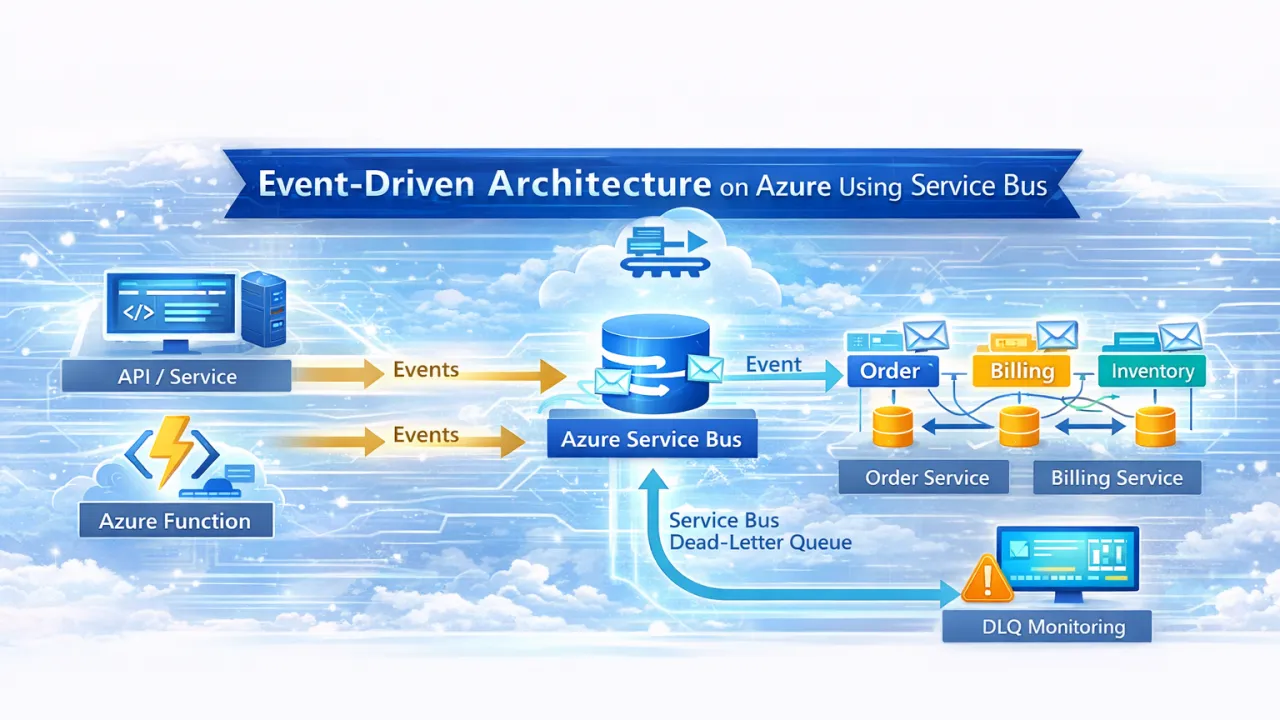
This is where Event-Driven Architecture (EDA) becomes a powerful design choice—and Azure Service Bus is one of the most reliable foundations for building it.
In this article, we explore how to design event-driven systems on Azure using Service Bus, when to use it, common mistakes to avoid, and how it fits into modern .NET and cloud-native architectures.
🧠 What Is Event-Driven Architecture?
Event-Driven Architecture is a model where:
- Producers emit events (something happened)
- Consumers react to those events asynchronously
- Systems are loosely coupled and independently scalable
Instead of asking:
“Can you do this right now?”
Systems say:
“This happened—do what you need, when you’re ready.”
This shift dramatically improves resilience, scalability, and autonomy.
☁ Why Azure Service Bus for Event-Driven Systems?
Azure offers multiple messaging options (Service Bus, Event Grid, Storage Queues). Service Bus is designed for enterprise-grade messaging where reliability and control matter.
Key strengths of Azure Service Bus
- Guaranteed message delivery
- At-least-once processing
- Message ordering (sessions)
- Dead-letter queues
- Transactions
- Fine-grained retry and lock control
- Secure, private networking support
Service Bus is ideal when:
- Losing messages is unacceptable
- Processing is critical to business workflows
- You need control over retries and failures
🧩 Core Building Blocks of Service Bus
1️⃣ Queues – Point-to-Point Messaging
- One message → one consumer
- Ideal for background processing and workflows
- Natural load leveling
Use cases
- Order processing
- Payment handling
- Job execution
- Workflow steps
2️⃣ Topics & Subscriptions – Publish/Subscribe
- One event → multiple subscribers
- Each consumer gets its own copy
- Enables system fan-out
Use cases
- Domain events
- Integration events
- Multiple downstream reactions
Example:
OrderPlaced → Billing, Inventory, Notifications, Analytics
3️⃣ Dead-Letter Queues (DLQ)
Messages land in DLQ when:
- Processing fails repeatedly
- Validation fails
- TTL expires
DLQ is not an error—it’s a control mechanism.
Every production system must monitor and handle DLQs intentionally.
🏗 Designing Event-Driven Systems on Azure
🔹 Define Clear Event Contracts
Events should:
- Represent facts (“OrderPlaced”, not “CreateOrder”)
- Be immutable
- Be versioned
- Avoid leaking internal models
Bad event design is the #1 cause of brittle event systems.
🔹 Prefer Asynchronous Boundaries
Avoid synchronous calls between services when:
- The consumer doesn’t need immediate feedback
- Reliability matters more than speed
- Scaling independently is important
Service Bus introduces temporal decoupling, which improves resilience.
🔹 Design for Idempotency
Service Bus guarantees at-least-once delivery, not exactly-once.
Consumers must safely handle duplicate messages by:
- Tracking message IDs
- Using idempotent database operations
- Designing side-effect-safe handlers
This is non-negotiable in production systems.
⚙ Azure Service Bus + .NET (Practical Patterns)
In .NET-based systems, Service Bus is commonly used with:
- ASP.NET APIs
- Azure Functions
- Background worker services
- Containerized microservices
Common patterns
- API publishes event → Service Bus topic
- Background worker processes messages
- Azure Functions scale consumers automatically
- Long workflows coordinated with Durable Functions
Service Bus acts as the backbone of asynchronous communication.
❌ Common Mistakes Teams Make
1️⃣ Treating Service Bus Like a Database
Service Bus is not:
- A data store
- A replay system
- A replacement for persistence
Events should be transient signals, not long-term state.
2️⃣ Over-Chattiness
Emitting too many fine-grained events leads to:
- Noisy systems
- Hard-to-understand flows
- Unstable contracts
Prefer meaningful business events, not technical noise.
3️⃣ Ignoring Monitoring & DLQs
Many Azure systems fail quietly because:
- No DLQ monitoring exists
- Failed messages pile up unnoticed
- Teams discover issues days later
Event-driven systems demand strong observability.
🔐 Security & Reliability Considerations
Production-ready Service Bus systems should include:
- Managed identities (no secrets)
- Private endpoints where required
- Retry policies with exponential backoff
- Circuit breakers on consumers
- Message size and TTL governance
Reliability is an architectural decision—not a configuration checkbox.
⚖ When NOT to Use Service Bus
Service Bus may be the wrong choice when:
- Events are purely reactive UI notifications → use Event Grid
- Throughput is extremely high with minimal guarantees → consider Event Hubs
- Simple, low-critical background jobs → Storage Queues may suffice
Choosing Service Bus means choosing correctness over convenience.
🏁 Final Thoughts
Event-Driven Architecture isn’t about adding messaging—it’s about changing how systems communicate.
Azure Service Bus enables teams to:
- Decouple services safely
- Scale independently
- Build resilient workflows
- Handle failure gracefully
- Evolve systems without breaking others
But success requires discipline:
- Thoughtful event design
- Strong consumer logic
- Observability from day one
If microservices are the structure, events are the nervous system.
Used correctly, Azure Service Bus becomes the backbone of reliable, scalable, cloud-native systems.