Chatbots have evolved far beyond static question-and-answer systems. Today’s users expect natural conversations, contextual understanding, personalization, and intelligent responses—across channels and at scale. Azure AI provides a comprehensive ecosystem to build such sophisticated conversational experiences, from basic FAQs to enterprise-grade virtual assistants.
This guide walks through the end-to-end process of building intelligent chatbots using Azure AI, highlighting how multiple services work together to deliver responsive, human-like interactions.
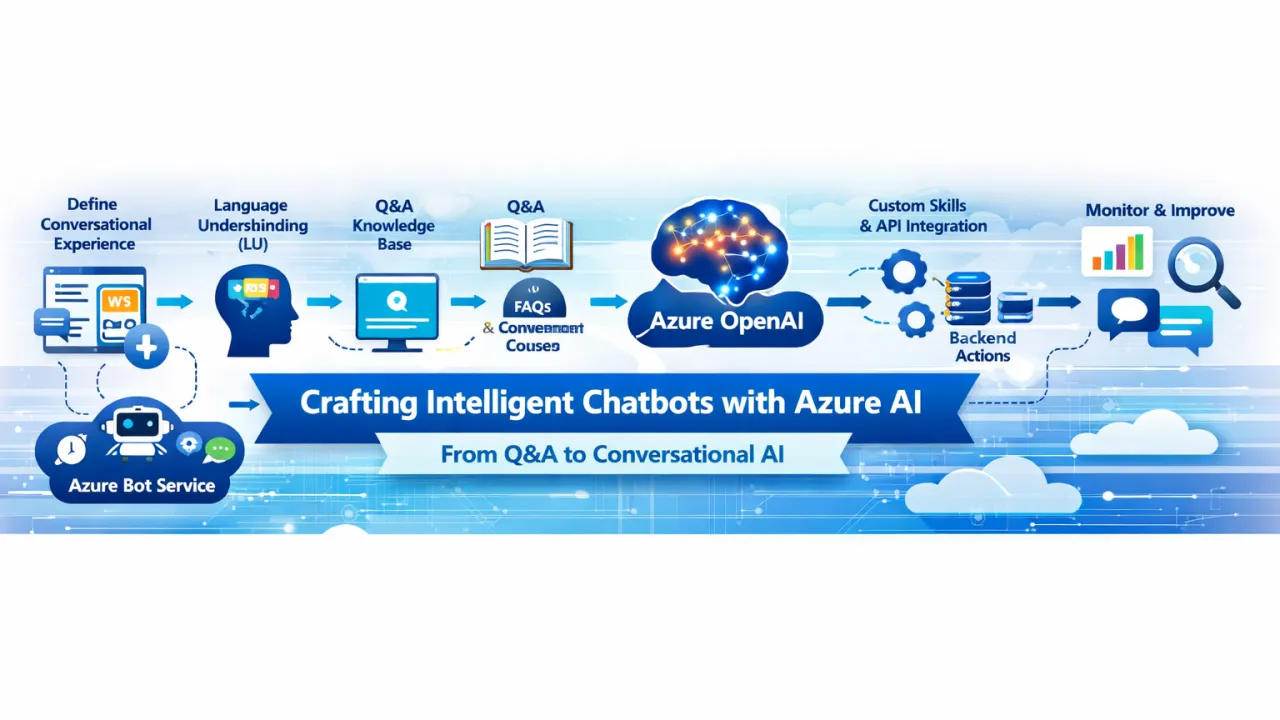
🧠 Step 1: Define the Conversational Experience
Before choosing tools, it’s critical to define:
- Purpose – Customer support, internal helpdesk, sales assistant, or task automation
- Channels – Web chat, Microsoft Teams, mobile apps, voice assistants
- Complexity – FAQ-based, intent-driven, or multi-turn conversational workflows
This clarity ensures the architecture aligns with business and user expectations.
🤖 Step 2: Core Bot Framework with Azure Bot Service
At the heart of the solution is Azure Bot Service, which acts as the orchestration layer for all conversational interactions. It:
- Manages conversations and sessions
- Connects to multiple channels
- Routes user input to the appropriate AI services
The bot itself can be built using familiar languages such as C# or JavaScript and deployed seamlessly to the cloud.
🗣️ Step 3: Natural Language Understanding (NLU)
To move beyond keyword matching, chatbots must understand user intent and context.
Language Understanding (LU)
- Extracts intents (what the user wants to do)
- Identifies entities (dates, locations, product names, IDs)
- Supports multi-turn conversations by tracking context
Example: A user asks, “Can I reschedule my delivery to next Friday?” The bot understands:
- Intent: Reschedule delivery
- Entity: Date = next Friday
This enables precise and relevant responses.
📚 Step 4: Knowledge-Based Answers with Q&A Capabilities
For FAQ-style interactions, Azure’s Q&A capabilities allow bots to:
- Answer questions from structured knowledge bases
- Pull responses from documents, PDFs, or web content
- Provide fast, consistent answers without custom logic
This is ideal for:
- Policy questions
- Product documentation
- Internal knowledge portals
🧩 Step 5: Intelligent Conversations with Azure OpenAI
To create truly natural and engaging conversations, Azure OpenAI adds generative intelligence to the chatbot.
Key capabilities:
- Human-like, free-form responses
- Context-aware dialogue across multiple turns
- Summarization, reasoning, and content generation
- Dynamic handling of unstructured or unexpected queries
This transforms chatbots from scripted responders into adaptive conversational agents.
🔧 Step 6: Extending Capabilities with Custom Skills
Enterprise chatbots often need to take action, not just talk.
Custom skills allow the bot to:
- Call APIs and backend systems
- Trigger workflows (orders, tickets, approvals)
- Integrate with CRM, ERP, or internal tools
- Execute business logic securely
Example: A chatbot that checks order status, updates customer details, or books appointments in real time.
🔄 Step 7: Context Management & Orchestration
By combining:
- Azure Bot Service for conversation flow
- Language Understanding for intent recognition
- Q&A for factual answers
- Azure OpenAI for generative dialogue
- Custom skills for business actions
You can build multi-turn, context-aware conversational experiences that feel seamless and intelligent.
📊 Step 8: Monitoring, Learning, and Continuous Improvement
Production-ready chatbots require ongoing optimization:
- Conversation analytics and telemetry
- Intent accuracy monitoring
- Feedback loops for retraining models
- Performance and latency tracking
Azure provides built-in monitoring tools to ensure bots improve over time.
🏁 Final Thoughts
Building intelligent chatbots is no longer about choosing a single AI service—it’s about orchestrating multiple AI capabilities into a cohesive conversational system. With Azure AI, teams can evolve from simple Q&A bots to enterprise-grade conversational platforms that understand intent, maintain context, integrate with business systems, and respond naturally.
By leveraging Azure Bot Service, natural language understanding, knowledge-based responses, generative AI, and custom skills—organizations can deliver chatbots that don’t just answer questions, but solve problems and enhance user experiences.
In the era of AI-driven interaction, great chatbots aren’t scripted—they’re intelligent, adaptive, and context-aware.